
A headless browser is a browser that runs without a graphical user interface (GUI). Instead of being controlled by users, they are designed to be controlled programmatically.
Over the past two decades, headless browsers have been primarily used for automation. This includes automated tests, web scraping, data extraction, and screenshot generation. Recently, however, they've surged in popularity due to their adoption by AI browser agents.
Headless vs Headful Browser
Headless browsers are basically just traditional web browsers running without a user interface. They support most of the core functionality of traditional web browsers. That includes parsing HTML, loading CSS, executing JavaScript, rendering content, and using local storage.
The two main benefits of headless browsers are that they can run on servers (no need for a display) and that they incur lower resource costs. This makes them great for running at scale, including in containers, cloud VMs, and CI/CD pipelines.
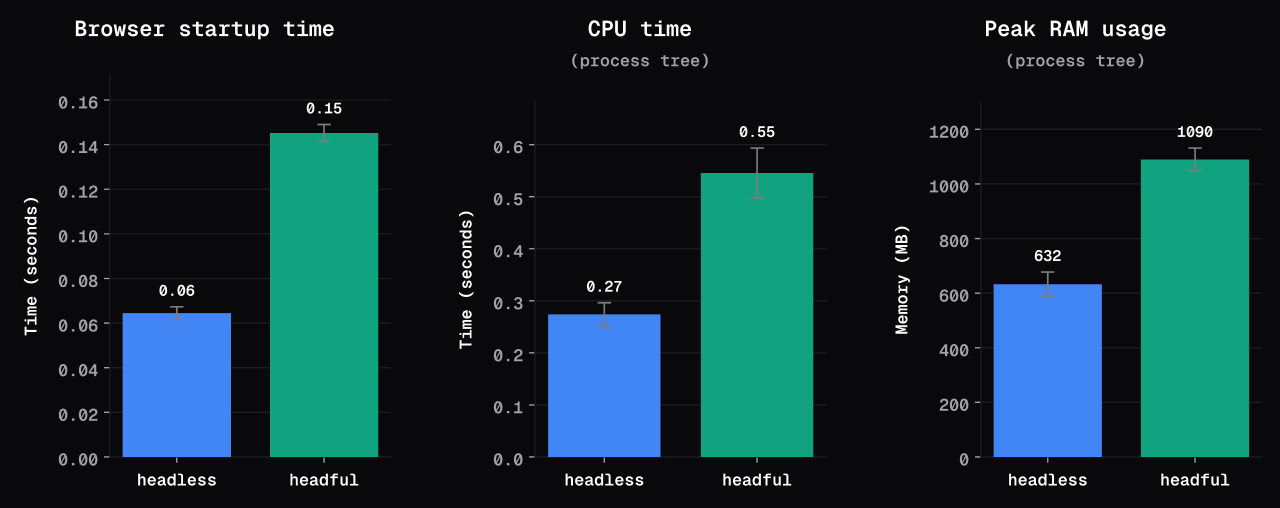
To get a rough estimate of how much faster headless browsers are, I ran a simple benchmark.
The benchmark results showed that headless browsers start around 60% faster, use 51% less CPU time, and 42% less peak RAM. There was no significant difference in page load time.
On the other hand, headful browsers are better for GPU-dependent work, pixel-accurate visual output, native browser behavior, and debugging. Additionally, they're more resistant to bot detection.
A common misconception is that headless browsers are more automatable than headful browsers. This is not true. The only reason headless is more prevalent than headful is the two benefits discussed above.
Here's a table summarizing the differences between the two browser modes:
| Headless | Headful | |
|---|---|---|
| Primary use | Automated testing, CI/CD pipelines, scraping | Local development, debugging |
| Performance | Faster startup, less CPU and RAM usage | Slower startup, more CPU and RAM usage due to GUI overhead |
| Automation | The default choice, appropriate for scale | Useful for testing before switching to headless mode |
| Screenshots & recording | Reliable for generating screenshots & PDFs | Allows capturing pixel-perfect screenshots and videos |
| Debugging & observability | Requires instrumentation | Gives you live visual view and the ability to use DevTools |
| Bot detection resistance | Weaker, though the gap has narrowed over the years | Stronger, since the browser is better at mimicking a real user |
Looking for better resistance to bot detection? Browser Use offers stealth browser infrastructure designed for running browsers at scale. See the Browser Infrastructure quickstart to launch a browser and connect your code.
How Headless Browsers Work
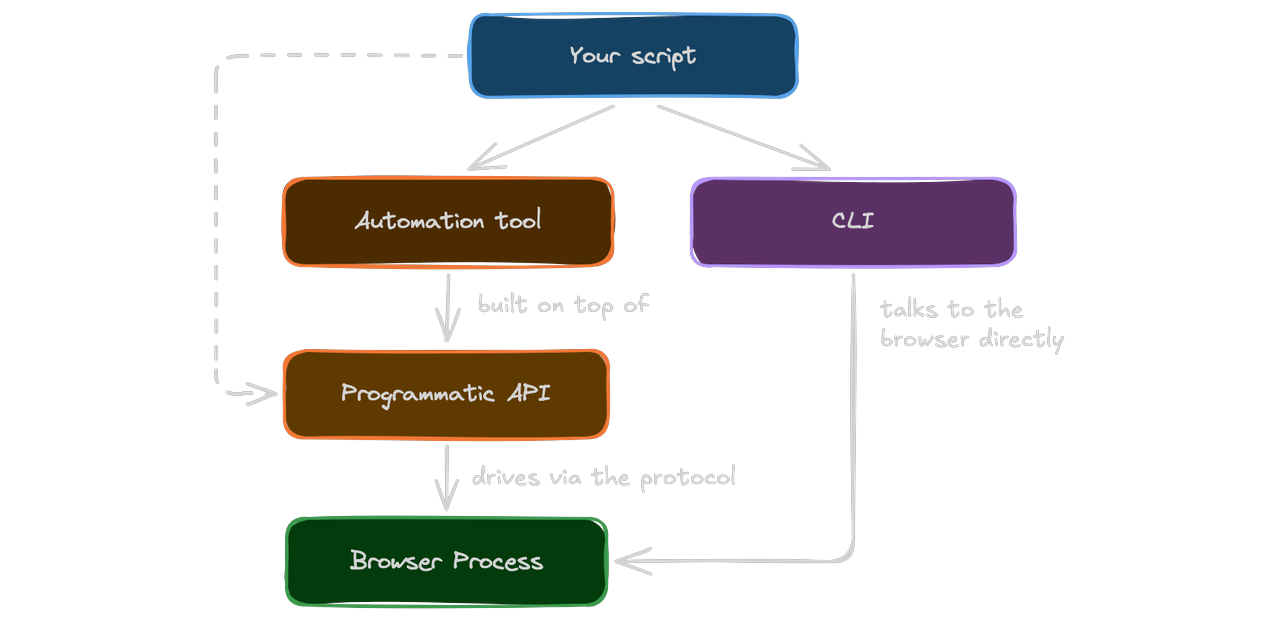
A headless browser doesn't have a visible window. There are no buttons to click, text inputs to fill out, or a mouse cursor to move visually. So how do you control it?
Generally speaking there are three ways, you can do it via:
- Command line interface (CLI), typically built into the browser
- Browser automation tool, e.g. Playwright, Puppeteer, Selenium
- Programmatic API, e.g. Chrome DevTools Protocol (CDP), WebDriver, BiDi
For most use cases, dedicated browser automation tools strike a good balance between control and ease of use. Using programmatic APIs is often too complicated, and browser CLIs are usually lacking in functionality.
The most popular browser automation tools are Selenium, Puppeteer, and Playwright:
| Selenium | Puppeteer | Playwright | |
|---|---|---|---|
| Primary use | Cross-browser testing | Chrome automation | Modern web & E2E testing |
| Focus | Testing & automation | Browser automation & scraping | Testing & automation |
| Browsers | Chrome, Firefox, Safari, Edge | Chrome, limited Firefox | Chrome, Firefox, WebKit |
| Languages | Java, Python, C#, JS, TS, Ruby | JS, TS | JS, TS, Python, Java, .NET |
| Protocol | WebDriver | CDP / BiDi | CDP |
| Created | 2004 | 2017 | 2020 |
| Strength | Broad ecosystem and compatibility | Simple & lightweight | Powerful features, great for SPAs |
| Downside | Cumbersome setup & synchronization | Limited browser support | Higher resource usage |
Headless Browser Use Cases
Headless browsers are a versatile tool. Let's look at their most popular use cases.
Test Automation
One of the most powerful use cases of headless browsers is test automation. Instead of manually performing tests each time, developers can write scripts that interact with the web app just as a real user would.
The most common types of automated tests include:
- End-to-end tests (E2E)
- Cross-browser tests
- Regression tests
- Performance tests
- Security tests
These can run directly as part of the CI/CD pipeline.
Web Scraping
Websites have come a long way from basic HTML and CSS. These days, most websites rely heavily on JavaScript. They render content dynamically, fetch data from the backend, and do other operations in the browser.
As a result, scraping with plain HTTP requests is no longer sufficient.
To scrape a dynamic website, you can either reverse engineer the network requests or use an automated browser. Since the latter is much easier, browser automation has become the de facto standard for web scraping.
A web scraper typically:
- Checks whether a website is server-side rendered; if so, it uses an HTTP request and scrapes the content.
- If not, it spawns a headless browser instance, opens the website, waits for the content to load, and then scrapes it.
Curious how to get started with web scraping? Check out The Ultimate Guide To Web Scraping.
AI Agents
In 2025, AI agents exploded in popularity. According to Matthew Prince, the CEO of Cloudflare, bot traffic has already surpassed human traffic.
LLMs are no longer limited to generating text or answering questions. They can now interact with websites by clicking buttons, filling forms, navigating pages, and reading content.
What makes this possible is browser automation tools and headless browser mode. Browser automation enables AI agents to use the browser, while headless browsers allow them to run at scale.
Screenshot Generation
Headless browsers can generate screenshots by rendering web pages without opening a visible browser window. This makes them great at generating screenshots of different sizes and resolutions.
Most browser protocols directly support screenshot generation. For example, Chrome DevTools Protocol (CDP) provides the Page.captureScreenshot command to capture the rendered website as a PNG, JPG, or other supported formats.
You can even try it yourself if you have Chrome installed:
$ google-chrome \
  --headless \
  --disable-gpu \
  --screenshot=screenshot.png \
  --window-size=1920,1080 \
  https://browser-use.com
PDF Generation
Headless browsers are also widely used to generate PDFs from web pages. Since the browser can render HTML and CSS just like a normal browser, you can create highly customized documents.
For example, you can use a headless browser to generate:
- Reports and dashboards
- Invoices and receipts
- Resumes and certificates
- E-books and documentation
Limitations of Headless Browsers
Headless browsers are powerful, but they come with a few limitations.
Difficult to Scale
Even though headless browsers generally consume fewer resources than headful browsers, they can still be expensive and difficult to run at scale.
A single browser instance can consume significant amounts of CPU and memory, especially when running multiple pages, loading complex websites, or executing JavaScript-heavy applications. Running hundreds or thousands of browser instances concurrently therefore requires careful resource management.
At scale, browser automation starts to look less like application development and more like DevOps.
Anti-Bot Systems
Historically, headless browsers were much easier to detect through browser fingerprinting, as they exposed their user-agent strings, automation flags, and contained CDP-related artefacts. In recent years, the bot detection gap between the two browsers has narrowed significantly.
Nevertheless, an unmodified headless browser is still easier to detect than an unmodified headful browser. According to our tests, headless Chromium was only able to avoid bot protection 2% of the time.
Over time, bot detection systems will become an even bigger problem for browser automation. Due to the growing popularity of AI agents, websites and platforms like Cloudflare are already making it harder for bots to reach them.
Harder to Debug
Debugging headless browsers is difficult, as you can't directly see what's going on. To debug them, you have to resort to browser & console logs, screenshots, or video recordings.
When doing browser automation, it's useful to first test with a headful browser and only later switch to a headless one.
Conclusion
Most modern browsers support two modes: headful and headless. The main difference between them is that headful opens an interactive window in which it renders the web page, while headless renders only in memory.
By skipping the GUI, headless browsers can run on servers and perform significantly faster. That makes them more appropriate for running at scale.
Headful browsers, on the other hand, excel at GPU-dependent work, browser-native functionality, visual debugging, and are generally more resistant to bot detection.
Want to run browsers at scale without the bot-detection headaches? Browser Use Cloud runs a patched headless browser built to handle both.