

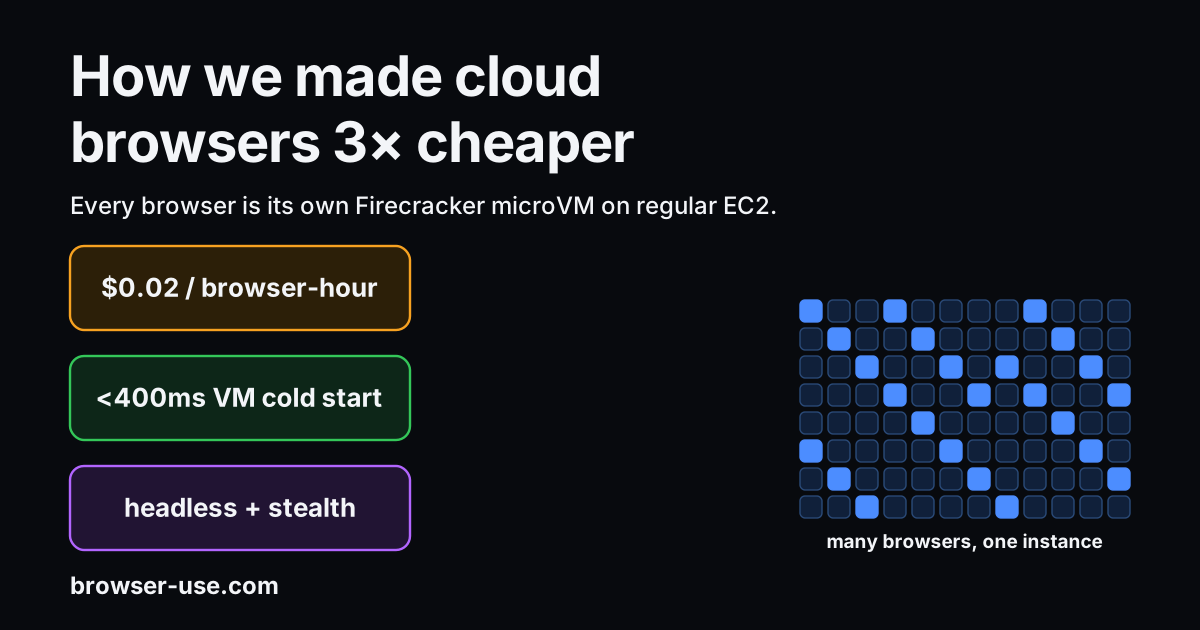
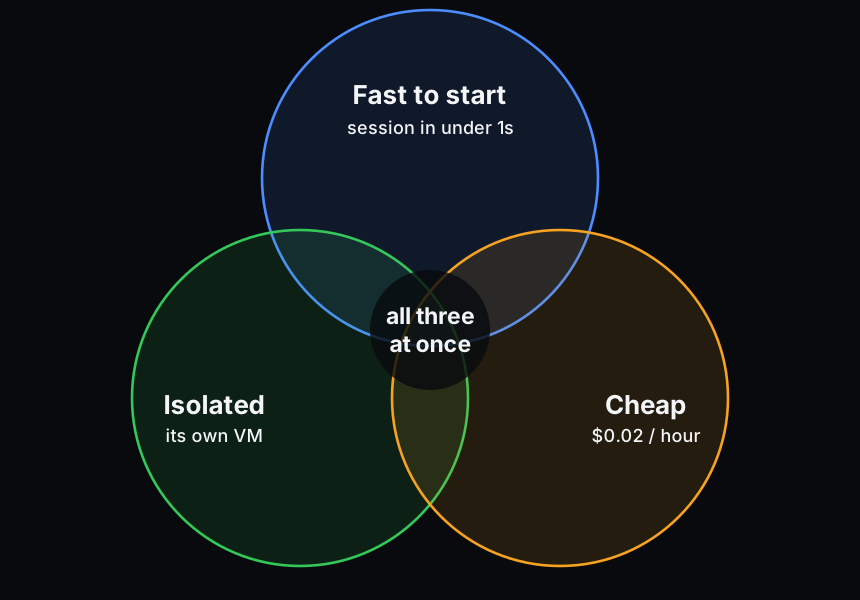
Our cloud browsers need to do three things at once: start quickly, remain isolated, and be cheap. That is why we rebuilt Browser Use Cloud, so a new session starts in under a second and costs $0.02 per browser hour, down from $0.06.
This is harder than it sounds. A browser has Chromium, a filesystem, cookies, cache, proxy settings, downloads, and sometimes a logged-in customer session. If one browser can read another browser's state, it creates a security problem.
The normal answer is a virtual machine, or VM. A VM is a computer inside a computer: it gets its own CPU, memory, disk, and network devices. It is separate from everything else on its host, and if the browser breaks, leaks information, or gets attacked, the damage stays within the VM.
Normal VMs, however, are too heavy for cloud browsers. We need to create them constantly, sometimes thousands at a time, and throw them away as soon as sessions end. If each browser needs a slow, expensive VM, the product becomes slow and expensive, too.
The question for us is whether we could give every browser its own VM without making users wait or pay for it. We now do that with Firecracker, a lightweight VM system.
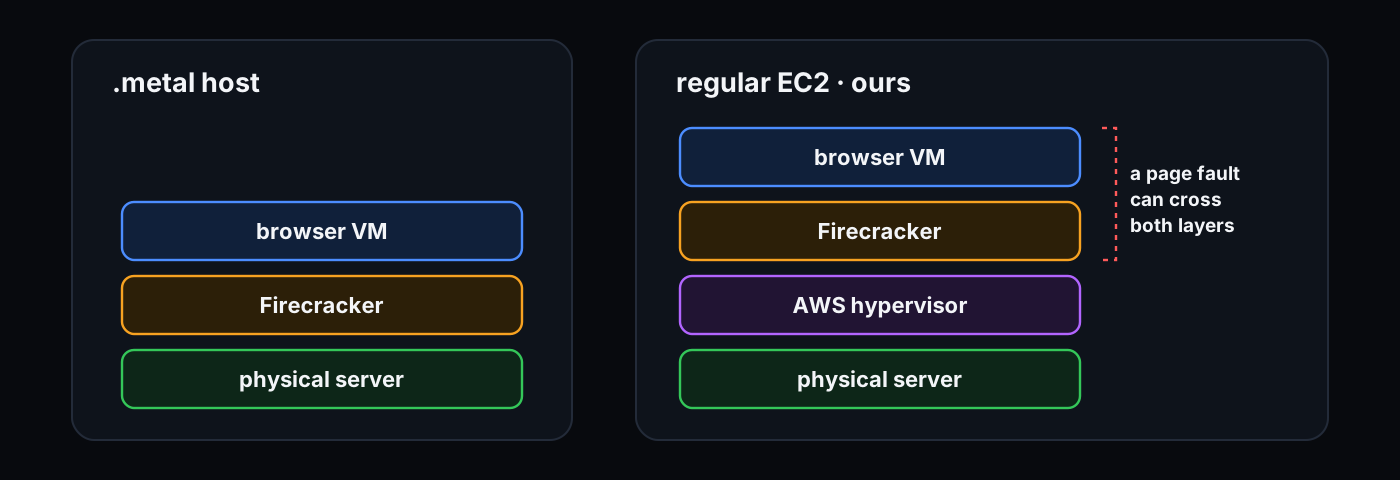
Every Browser Use Cloud session runs in its own, tiny VM. These VMs run on EC2, Amazon's rented cloud servers.
That is the unusual part. Firecracker is normally run on bare-metal servers, where you rent the whole physical machine. To reduce customers' cost, we run it on regular EC2, where AWS has already put your server inside a VM.
This should be slow. Nested VMs make memory and CPU operations more expensive, and Chromium takes time to start. This post is about how we made this setup fast and efficient.
But first, why did we rebuild our infrastructure?
Why We Took Ownership of the Infrastructure Layer
When we first built our browser infrastructure on Unikraft, it gave us a lot of what we needed out of the box: fast startup times, browser snapshotting, scale-to-zero, and strong isolation.
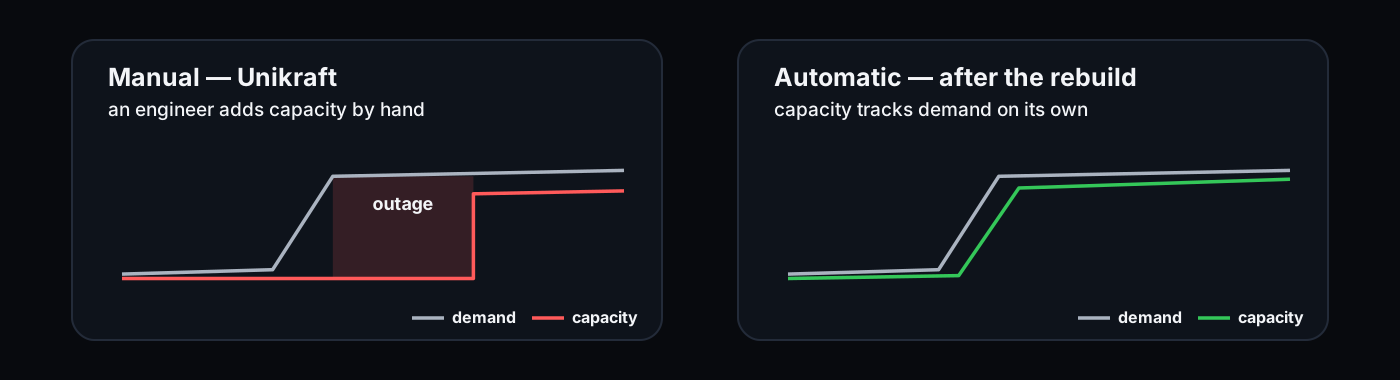
As our workload grew, we ran into a different challenge: scaling the underlying EC2 fleet itself.
While Unikraft handled browser lifecycle management well, native horizontal EC2 autoscaling was not available through our setup at the time. We knew this capability was on Unikraft's roadmap, but we needed it immediately, so we decided to take ownership of that part of the stack and build directly on Firecracker.
It is important to note that this was not about browser scaling. Unikraft already handled browser standby, wake-up, and scale-to-zero effectively. The limitation we hit was at the infrastructure layer, not the browser layer. Provisioning new nodes was a manual process, which could cause downtime when request capacity exceeded machine capacity.
In other words, we did not move away because they could not run efficient browsers. We took over the infrastructure layer because we needed functionality that was not yet available in the platform. We still look forward to continuing our collaboration with Unikraft in the future :)
Firecracker provides a layer through which you can create, monitor, and run VMs. It gives each VM CPU, memory, disk, and network devices, and it keeps it isolated from the host and from other VMs.
Teaching browsers to scale themselves
Firecracker gave each browser its own VM. But it did not inherently solve the problem that broke the old system: deciding how many VMs to run, where to put them, and when to add more.
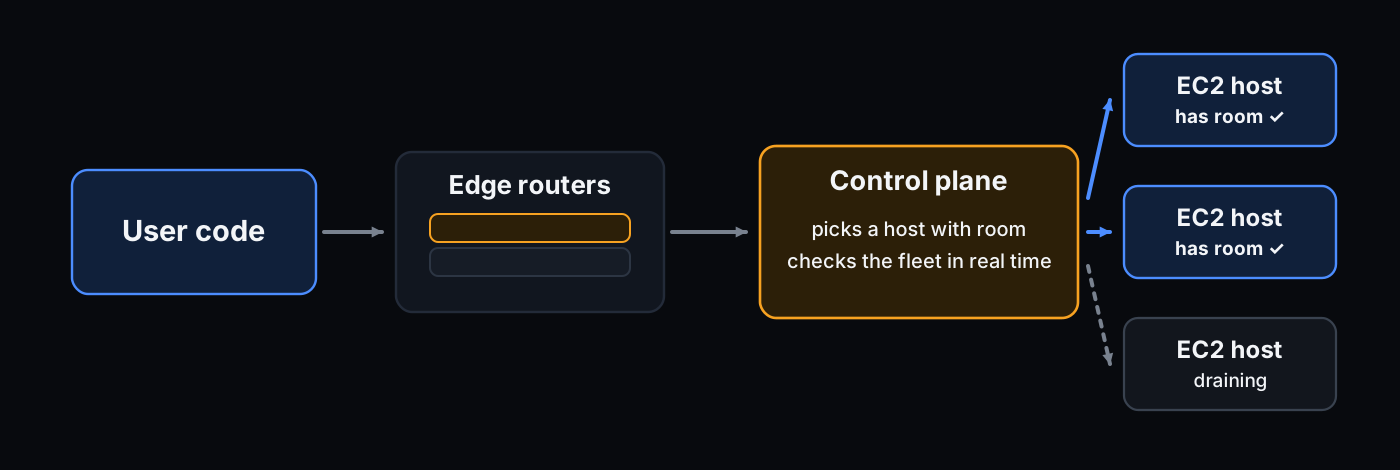
So we built our own control plane. The control plane monitors our fleet of browsers and decides whether we should scale up or down.
When a user asks for a browser, the control plane picks a machine with room. When traffic rises, it starts more machines. When traffic falls, it stops sending new browsers to machines we want to remove.
It checks the fleet in real time. That is much faster than waiting on CloudWatch, AWS's monitoring service, which usually reacts on one-minute windows. It also knows things generic metrics do not: browsers that are still starting, machines we are trying to remove, and machines that should not receive new sessions.
Why we run VMs inside VMs
Once we had a control plane, the next question was what kind of machines it should add.
The usual way to run Firecracker on AWS is a .metal instance. This means you rent the whole physical server, and Firecracker runs directly on it.
We chose regular EC2 instead. Regular EC2 machines are faster to get and cheaper to keep around. Our hosts boot from a pre-built image and start serving browsers about 30 seconds after launch. The faster we can add a host, the less idle capacity we need to pay for, and the lower the cost we pass on to our customers.
The catch is that regular EC2 is already a VM. AWS runs our host inside its own isolation layer, and then we run browser VMs inside that host. In other words, every browser is a VM inside a VM.
This is not the normal way of using Firecracker. When a browser VM needs help from the host, the request passes through two VM layers instead of one, adding latency.
We decided the tradeoff was worth it, as regular EC2 gives us faster scale-up and lower cost. To mitigate the effects of nested virtualization, we focused on making Firecracker as speedy as possible.
From request to usable browser
When a user asks for a browser, the control plane picks a machine with room. That machine restores a saved browser VM, starts Chromium inside it, waits until Chromium is ready to be controlled, and returns a connection URL.
That URL is what the user's agent connects to. Browser Use controls Chromium over a WebSocket using the Chrome DevTools Protocol, or CDP. CDP is the remote-control API for Chrome: click this button, type this text, read this page, take this screenshot.
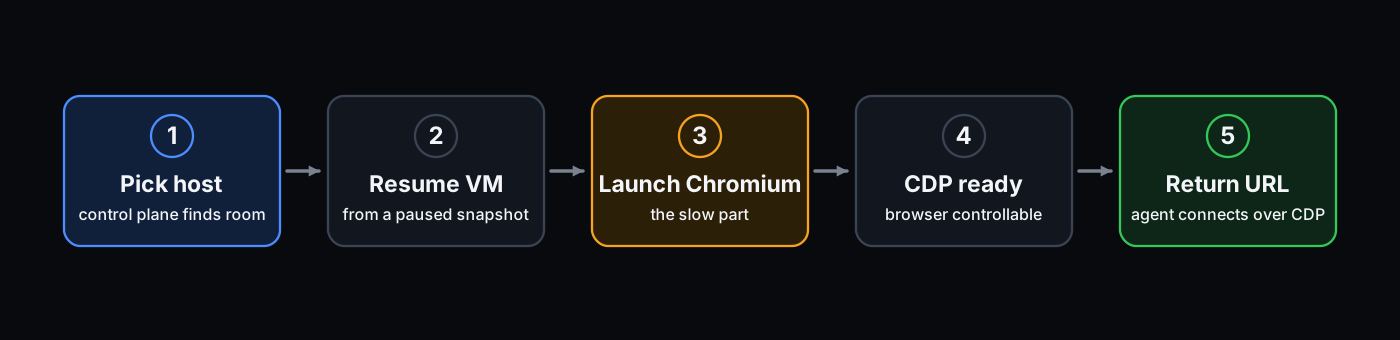
Three things made this take longer: restoring the VM's memory, launching Chromium, and keeping the browser stealthy and undetected by anti-bot security.
The first slowdown: memory
The first bottleneck was memory.
A production browser is not booted from scratch. We resume it from a snapshot: a saved VM that is already booted and paused just before Chromium launches. Resuming a VM is much faster than booting one.
Our first resumes were still too slow. When a restored VM touches memory for the first time, the host has to map that memory back in. This event is called a page fault. In a nested VM, each page fault is expensive because it can cross both VM layers.
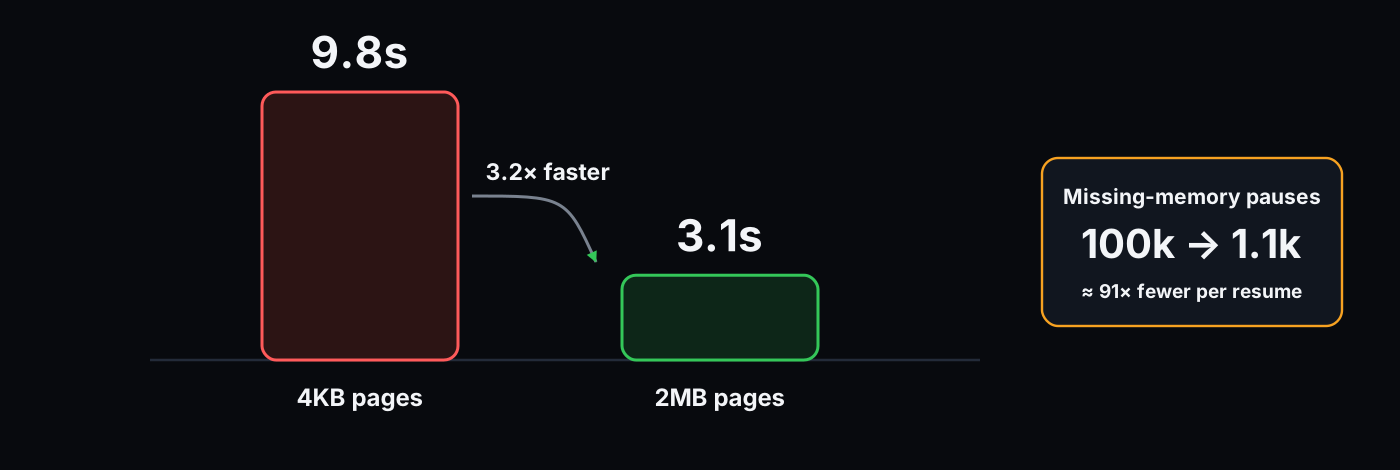
During an early cold start, page faults were 72% of all VM exits. Getting from resume to a CDP-ready browser took 9.8 seconds.
The fix was to map memory in larger chunks. Before, the VM restored memory in 4KB pages. Now, it uses 2MB pages. Each page covers 512 times more memory, so the browser triggers far fewer page faults while it wakes up. Fewer page faults mean fewer trips through the nested VM layers.
We also now handle page faults ourselves with a custom handler for userfaultfd, a Linux API for handling missing memory pages. Before the VM starts running, our handler loads the memory Chromium is most likely to access first.
Our handler keeps Chromium from receiving a flood of page faults as it starts. The host has already loaded the hot pages, and the remaining pages arrive before the browser needs most of them.
These changes cut the time from resuming the VM to having a browser ready to accept commands from 9.8 seconds to 3.1 seconds. They also cut the number of times the browser VM had to stop and ask the host to handle missing memory from roughly 100,000 times per resume to about 1,100, about a 91x drop.
We made smaller refinements, too. The VM was spending 500ms looking for an old PS/2 keyboard that didn't exist. We disabled this check.
Additionally, we changed how the host waits for the browser to become ready. Before, the host kept polling the VM with HTTP requests. That created extra VM exits, or moments when the browser VM had to pause so the host could handle work for it.
Now, the browser driver writes a ready message to its log, and the host reads that log over vsock, a fast communication channel between the host and the VM. The host sees the ready message in under a millisecond.
The second slowdown: Chromium startup
The next bottleneck was CPU.
When Chromium starts, it is hungry and demanding. It creates renderers, compositors, and V8 isolates at once. After that, browser automation is much quieter. An agent clicks, waits, reads, clicks again.
Because Chromium is quieter after it has started, we can pack many browsers into the same instance. A single host can accommodate many browsers because browsers spend most of their time waiting: waiting for a page, a network response, or the next agent action.
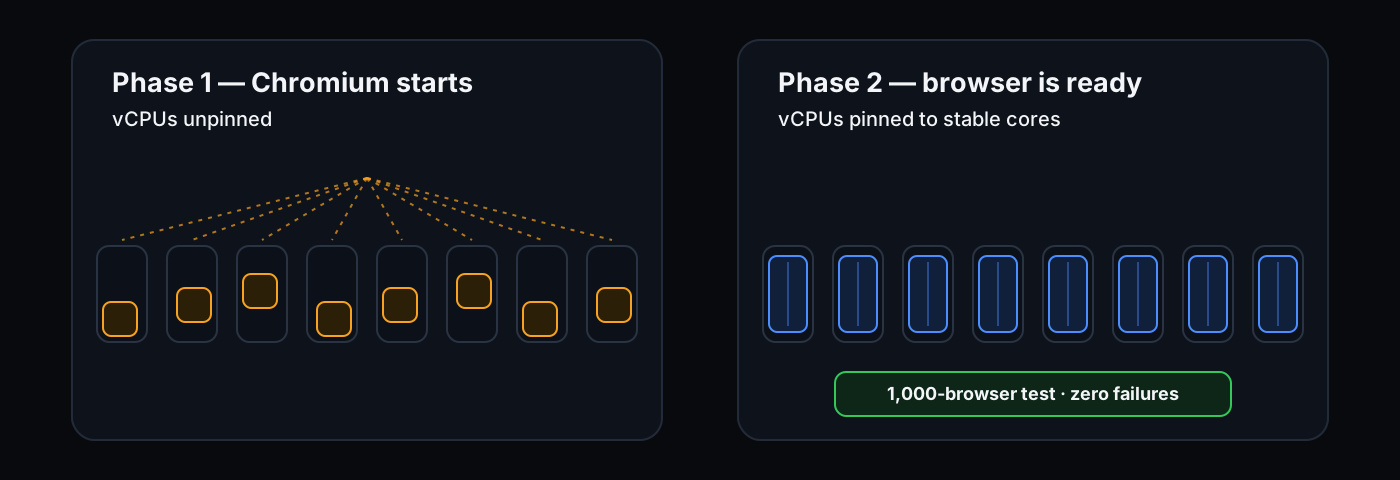
We handle the launch burst in two phases. While a browser resumes and Chromium starts, we leave its virtual CPUs unpinned. That means Linux can move the browser's CPU work across the host instead of locking it to fixed cores. This spreads the burst out.
Once the browser reports that it's ready, we pin those virtual CPUs to stable cores. That means the browser VM now runs on specific cores. Stable placement lets us pack more browsers onto the same host without guessing. We know which cores are taken, which ones still have room, and which browsers might interfere with each other.
The launch phase is like letting a crowd enter through every open door. Once everyone is inside, assigned seats work better.
Pinning from the start made things worse. When many browsers launched at once, they piled onto the same hot cores, and some launches failed.
We also became careful about hyperthreads. A physical CPU core often appears as two logical CPUs, called sibling threads. Those siblings still share the same physical core. If two browser VMs each get one sibling, they fight over the same core. Under nesting, that contention showed up as failed launches. To prevent this, each browser now gets both sibling threads of the physical core it uses.
Finally, we give each pinned vCPU thread real-time priority. That tells Linux to run the browser VM immediately when it needs CPU, instead of pausing it behind less important work. Before this change, a 1,000-browser test lost 17% of sessions shortly after being created. After it, the same test lost zero.
Staying stealthy without a screen
The last bottleneck was stealth.
A headless browser runs without a visible window. A headful browser runs like the browser on your laptop, with a window, graphics, and rendered frames.
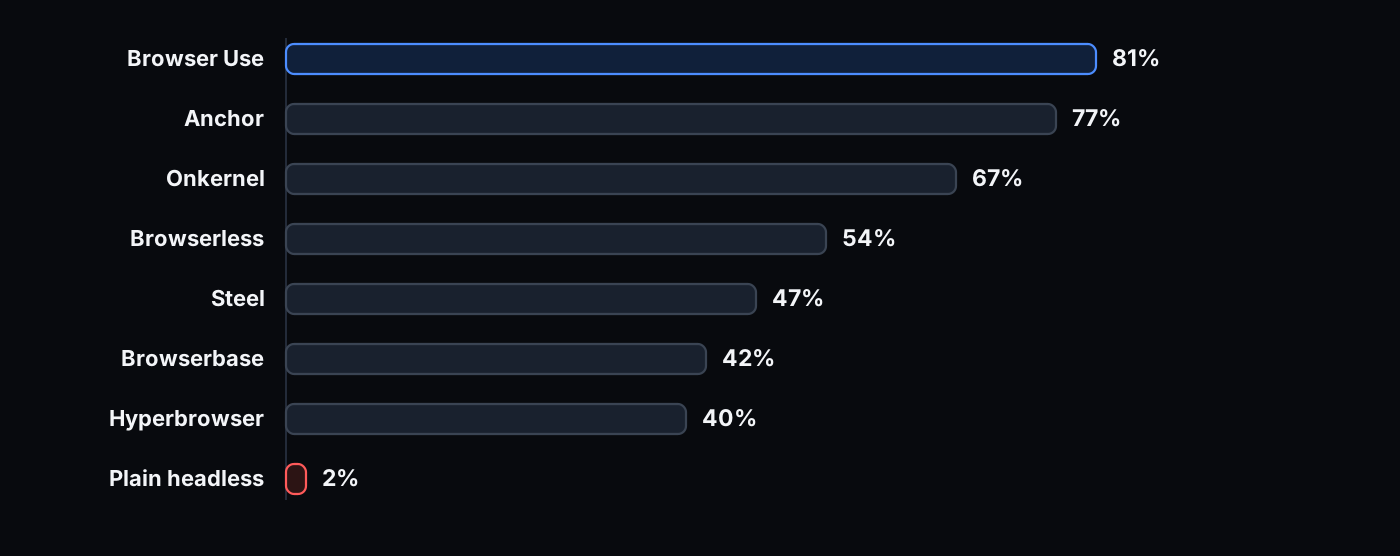
Plain headless Chromium is easy to detect by websites with anti-bot measures. Plain headless Chromium avoided getting blocked by websites only 2% of the time, according to our stealth benchmark. The same Chromium, headful with a visible window, avoided blocks 50% of the time just by rendering content.
That is why most providers run headful browsers. They pay for a display server, a GPU, and a compositor drawing frames for a screen nobody looks at.
We run our browsers fully headlessly. This is only possible because we changed the browser itself.
The first component is our Chromium fork. Many stealth tools hide automation by injecting JavaScript into every page after the browser starts. For example, they overwrite browser properties like navigator.webdriver, a flag that tells websites whether the browser is being controlled by automation, so the page sees false instead of true. Websites can often detect when such values are overwritten. To avoid this, we patch Chromium at its lowest level, so our patches are never exposed in the first place.
The second component is our fingerprinting. A browser fingerprint consists of details a website reads about your browser and machine, including your operating system, screen size, fonts, graphics, output, audio, timezone, language, and hundreds of other details. Systems that detect bots check if these details look like a real user's browser or a fake automation environment. We use tens of thousands of real fingerprints across macOS, Windows, and Linux.
Our browsers avoid blocks 81% of the time on our stealth benchmark, and 84.8% on Halluminate BrowserBench, the highest of any provider. Because there is no display, browsers are cheaper to run and easier to scale.
Connecting to the right browser
Once a browser is ready, users connect to it through CDP. The public URL is a WebSocket URL.
In front of the browser fleet are simple edge routers. A router gets the WebSocket connection, asks the control plane where that browser lives, and forwards the raw CDP bytes to the right VM.
The routers do not decide where browsers run. If one dies, another router can take over new connections. The control plane is in charge of placement. The routers only move bytes.
The result
Each of your browser sessions consists of a tiny VM resumed from a snapshot, running inside regular EC2, with headless Chromium inside it.
The VM cold start is under 400ms. End to end, through the public API, browser create latency is 825ms at p50 and 1.35s at p99. We measured this during a 10,000-session stress test in which every browser started successfully.
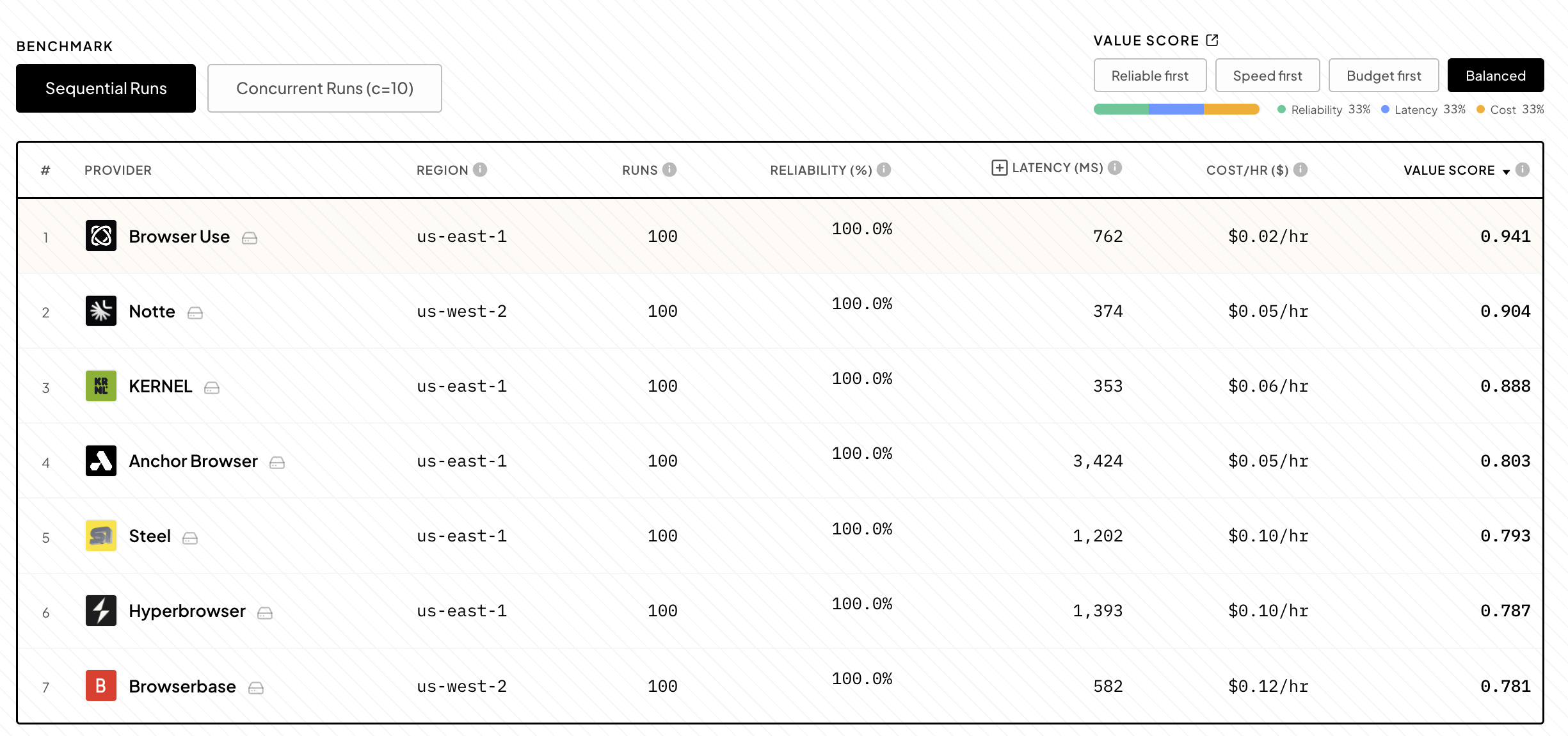
Browsers on this infrastructure are live today. Start with Browser Use Cloud.
The biggest remaining cost is Chromium itself. Starting Chromium after resume still takes about 545ms at p50.
Any further improvements, then, must come from the browser itself.
Next: skip Chromium startup
Today, we snapshot the VM just before Chromium starts. That keeps the snapshot simple: every browser wakes up from the same, clean point, then launches Chromium for itself.
But Chromium startup is now the largest remaining cost. The next step is to snapshot later, after Chromium is already running. Then, a new session does not have to start the browser at all. It wakes up with the browser already alive.
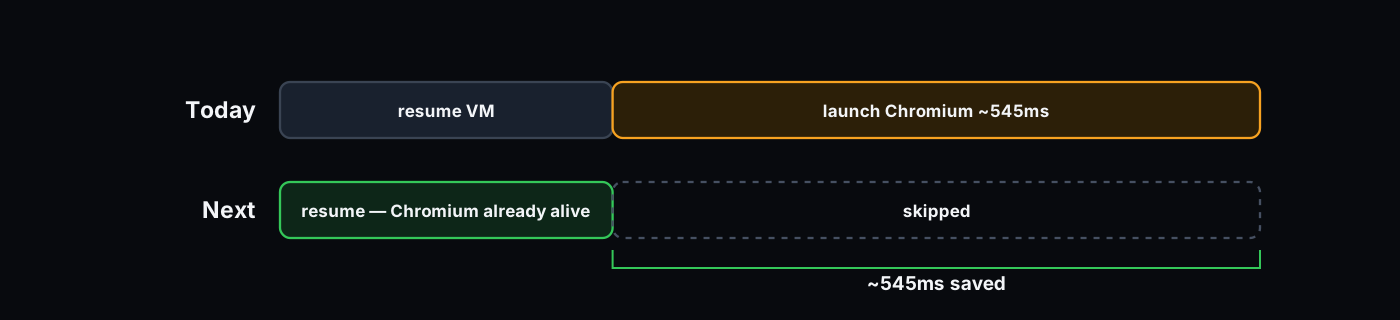
This is complex, as a running browser has open devices, timers, graphics state, network state, and fingerprint state. Before we freeze it, we need to put all of these things into a safe state. After we restore it, each browser still needs to look like its own browser, not a clone of the last one.
This is what we are working on next.
The fastest browser is the one you barely have to boot. We got the VM startup under 400ms by running Firecracker where it is not supposed to run. Next, we are making new sessions wake up with Chromium already running.
Browsers on the aforementioned infrastructure are live at cloud.browser-use.com.