Playwright, Selenium, and Puppeteer are widely used browser automation tools. They can be used for end-to-end testing, web scraping, screenshot generation, and increasingly to enable AI agents to use the browser.
In this article, we'll compare their browser support, languages, waiting behavior, and testing tools. We'll also look at when an AI browser agent such as Browser Use fits the task.
TL;DR
Choose Playwright for a new end-to-end test suite, especially if you want JavaScript or TypeScript tests with integrated debugging tools. Choose Selenium when you need actual Safari testing, an existing Grid setup, or compatibility with your team's established test suite. Puppeteer is a good fit for Node.js scripts that generate PDFs, take screenshots, or scrape pages.
Here's how the three tools compare:
| Criterion | Playwright | Selenium | Puppeteer |
|---|---|---|---|
| Best fit | New end-to-end test suites | Existing test suites, Grid, actual Safari | Node.js scraping, screenshots, PDFs |
| Browsers | Chromium, Chrome, Edge; patched Firefox and WebKit | Chrome, Edge, Firefox, Safari | Chrome and Firefox; no WebKit |
| Languages | JavaScript, TypeScript, Python, Java, .NET | Java, Python, C#, JavaScript, Ruby | JavaScript, TypeScript |
| Protocol | CDP for Chromium; custom protocols for Firefox and WebKit | WebDriver Classic and WebDriver BiDi | CDP by default for Chrome; BiDi for Firefox |
| Waiting | Actionability checks on locator actions; retrying assertions in Playwright Test | Explicit waits for application conditions | Locator actions auto-wait; lower-level APIs need explicit handling |
| Test runner | Playwright Test for JavaScript/TypeScript; language-specific integrations elsewhere | Pair WebDriver with a test runner | Pair the library with a test runner |
| Parallel execution | Playwright Test workers and CI sharding | Test runner parallelism and Selenium Grid | Build concurrency into your script or runner |
| Debugging | Inspector, Trace Viewer, Playwright Test reports | Browser/driver logs and test runner tooling | Chrome DevTools and CDP access |
| Setup | Install package and browser builds | Selenium Manager handles supported drivers automatically | Install package and supported browsers |
| Main limitation | WebKit is not the Safari app; Firefox requires a patched build | More synchronization and test tooling to assemble | No WebKit; CDP-specific features don't transfer to Firefox |
The browser distinction matters: Playwright covers three rendering engines, while Selenium can drive Apple's Safari application. Puppeteer supports Firefox as well as Chrome, so browser choice alone no longer separates it from Playwright as clearly as it once did.
Selenium
Selenium is a pioneering framework for browser automation. It was started by Jason Huggins in 2004. Over time, the team behind Selenium developed multiple browser automation tools, including:
- Selenium IDE (2006) -- a browser extension that lets you record, edit, and play back interactions with websites and web apps.
- Selenium Grid (2008) -- allows running web tests in parallel across multiple machines, browsers, and operating systems at the same time.
- Selenium WebDriver (2011) -- formed the basis for the W3C WebDriver standard, which became a W3C Recommendation in 2018. Most major web browsers support it, including Chrome, Firefox, Safari, and Edge.
Classic WebDriver sends commands through a browser driver, as shown below:

Selenium also supports WebDriver BiDi, which adds bidirectional communication for capabilities such as network and log events. Support varies by browser, language binding, and feature, so check the APIs your workflow needs. The diagram above shows the classic path.
Selenium's main use cases include automated UI testing, regression testing, cross-browser testing, and web scraping.
The framework's main advantages are its standards-based browser control, mature ecosystem, and compatibility with existing test infrastructure. It supports Java, Python, C#, JavaScript, and Ruby. Selenium can also test actual Safari through Apple's safaridriver, which matters when you need to validate behavior in the browser your users run.
Setup has become easier: Selenium Manager automatically discovers, downloads, and caches supported drivers when you haven't supplied one. You still need to configure your test runner and, for distributed tests, the machines or service running your browsers.
The main trade-off is the amount of synchronization and tooling you assemble yourself. Selenium works with single-page applications, but your script needs explicit waits for conditions such as a loading indicator disappearing or a result becoming visible. Poorly chosen waits can make tests flaky in any framework.
The examples below each wait for the first <h1> to be visible, then read its rendered text. They demonstrate extraction, not a speed benchmark or an assertion that the text is correct.
For Selenium, run npm install selenium-webdriver, save this as selenium.cjs, and run node selenium.cjs. This example uses an installed Chrome browser; Selenium Manager handles the driver.
// selenium.cjs

const { Builder, By, until } = require("selenium-webdriver");

(async () => {
  // Launch a new Chrome browser instance (via ChromeDriver)
  const driver = await new Builder().forBrowser("chrome").build();

  try {
    // Navigate to the target page
    await driver.get("https://browser-use.com/");

    // Wait for h1 to appear in the DOM and for it to render
    const h1 = await driver.wait(until.elementLocated(By.css("h1")), 10000);
    await driver.wait(until.elementIsVisible(h1), 10000);

    // Extract the visible text and log it
    const text = await h1.getText();
    console.log("H1:", text);
  } finally {
    // Close the browser (even if an error was raised)
    await driver.quit();
  }
})();
Puppeteer
Puppeteer is a Node.js library for browser automation that Google created in 2017. The library was released right after Chrome shipped its headless mode. Puppeteer uses the Chrome DevTools Protocol (CDP) by default for Chrome and WebDriver BiDi for Firefox. You can also opt into BiDi for Chrome.
Chrome DevTools Protocol is a low-level interface for inspecting and controlling Chromium-based browsers. It supports commands and browser events over a persistent connection. Selenium also offers bidirectional communication through WebDriver BiDi; the protocol alone does not establish which library will finish your task fastest.

BiDi is architecturally similar to CDP but vendor-agnostic.
The library is mostly used for scraping both traditional websites and SPAs, taking screenshots, PDF generation, and other browser automation tasks.
Puppeteer gives Node.js scripts access to browser capabilities such as network interception, debugging, performance monitoring, and device emulation. Some capabilities depend on the browser and protocol, so check support before moving a Chrome workflow to Firefox.
Firefox support is production-ready as of Puppeteer 23. That makes it a practical option for Chrome and Firefox automation, although CDP-specific APIs remain tied to Chromium. Puppeteer doesn't support WebKit and its official library is limited to JavaScript and TypeScript.
Puppeteer also has locators that automatically wait for an element to be ready for an action. For example, a locator click checks visibility, whether the element is enabled, and whether its bounding box is stable. Lower-level APIs such as waitForSelector() give you more responsibility for waits and retries.
For Puppeteer, run npm install puppeteer to install the library and Chrome for Testing. If your package manager blocks the browser download, run npx puppeteer browsers install. Save the script as puppeteer.cjs and run node puppeteer.cjs:
// puppeteer.cjs

const puppeteer = require("puppeteer");

(async () => {
    // Launch a new Chrome browser instance
    const browser = await puppeteer.launch();

    try {
        const page = await browser.newPage();

        // Navigate to the target page
        await page.goto("https://browser-use.com/");

        // Wait for h1 to appear in the DOM and for it to render
        const h1 = await page.waitForSelector("h1", {
            visible: true,
            timeout: 10000,
        });

        // Extract the visible text and log it
        const text = await h1.evaluate((el) => el.innerText);
        console.log("H1:", text);
    } finally {
        // Close the browser (even if an error was raised)
        await browser.close();
    }
})();
Playwright
Playwright is a browser automation framework developed at Microsoft and open-sourced in January 2020. It was created by the same group of engineers who had previously worked on Puppeteer.
Playwright supports Chromium, Firefox, and WebKit, with APIs for JavaScript, TypeScript, Python, .NET, and Java. Its tooling includes isolated browser contexts, code generation, an inspector, and Trace Viewer for examining what happened during a run.
Playwright's communication works similarly to Puppeteer. It uses CDP for Chromium-based browsers, and custom protocols for Firefox and WebKit:

For JavaScript and TypeScript testing, Playwright Test adds a test runner, retrying assertions, isolated test contexts, parallel workers, retries, and reports. The Playwright library handles browser automation and can be used in standalone scripts. Python, Java, and .NET use their own test runner integrations; they don't run through the JavaScript Playwright Test runner.
Auto-waiting checks whether an element is ready for the requested action. A click, for example, waits for the target to be visible, stable, enabled, and able to receive events. That doesn't mean every read waits for the application's final state: reading textContent() is different from using a retrying assertion to check the expected text.
The main compatibility caveat is that Firefox and WebKit require Playwright-specific builds. WebKit coverage helps catch engine differences, but it isn't a test of the Safari application. Playwright can also drive branded Chrome and Edge, so the patched-browser restriction doesn't apply to every browser it supports.
For Playwright, run npm install playwright and npx playwright install chromium. Save the script as playwright.cjs and run node playwright.cjs:
// playwright.cjs

const { chromium } = require("playwright");

(async () => {
    // Launch a new Chromium browser instance
    const browser = await chromium.launch();

    try {
        const page = await browser.newPage();

        // Navigate to the target page
        await page.goto("https://browser-use.com/");

        // Wait for the first h1 to be visible
        const h1 = page.locator("h1").first();
        await h1.waitFor({ state: "visible", timeout: 10000 });

        // Extract the visible text and log it
        const text = await h1.innerText();
        console.log("H1:", text);
    } finally {
        // Close the browser (even if an error was raised)
        await browser.close();
    }
})();
Playwright vs Puppeteer
Choose Playwright when your main job is testing an application across browser engines. For a JavaScript or TypeScript suite, Playwright Test gives you a shared setup for assertions, retries, parallel execution, and reports. WebKit coverage is another reason to pick it over Puppeteer.
Puppeteer is a good fit when you already work in Node.js and need a focused script, such as generating PDFs from invoices or taking scheduled screenshots. It supports both Chrome and Firefox, and its locator API handles common action waits. You don't need to migrate a working Puppeteer script just to get auto-waiting.
Both libraries can scrape pages and control browsers for other automation. The deciding question is whether you need Playwright's testing workflow and WebKit support, or whether Puppeteer's browser API already covers the job.
Playwright vs Selenium
For a new JavaScript or TypeScript test suite, Playwright is a useful default: its locator actions and integrated test tooling reduce the synchronization and reporting code you need to assemble.
Selenium is the stronger fit when you need actual Safari, already run tests through Selenium Grid, or have a substantial suite built around WebDriver. A team with established Java, C#, Python, or Ruby tests should weigh the cost of rewriting fixtures, helpers, and reporting before switching. Playwright supports several of those languages too, so language choice alone doesn't settle the comparison.
For example, use Playwright's WebKit build to catch rendering-engine differences during development. If your release checks specifically require Apple's Safari application on macOS, use Selenium for that coverage. An existing Selenium suite that reliably tests your application can remain a sensible choice.
Puppeteer vs Selenium
Choose Puppeteer for a Node.js automation job whose browser requirements fit Chrome or Firefox. A scheduled screenshot or PDF service is a natural fit: your script controls the browser directly, without needing to assemble a full test suite.
Choose Selenium when the task belongs in an existing test framework, needs Safari, or must run across a Grid of browser and operating-system combinations. Its language bindings also let you keep browser tests in the same language as the rest of your test infrastructure.
Both tools can automate dynamic pages. Puppeteer's locators provide action waits, while Selenium gives you explicit conditions to wait for. In either case, wait for the state your task actually needs, such as a completed search result, before extracting data or making an assertion.
For web scraping, Puppeteer is a reasonable starting point for a new Node.js job targeting Chrome or Firefox. Selenium fits when your scraper needs to stay in Python, Java, C#, or Ruby, or reuse a working WebDriver setup. Playwright is another option for Python scraping. Our web scraping guide covers the broader choice between extraction scripts and agents that navigate pages.
If speed is the deciding factor, compare the same task, browser version, machine, waits, and concurrency. Measure browser startup separately from navigation and extraction, and record failures as well as successful run times. This article does not establish a universal performance winner.
Where Browser Use Fits
With the three tools above, you write the browser actions and conditions in code. An AI browser agent can instead work from a goal, such as collecting invoices from several supplier portals. It decides which actions to take as it encounters each page.
Browser Use offers an open-source Python agent library and hosted Browser Use Agents for this kind of work. Agents can adapt to unfamiliar layouts, but runs can take different paths, incur model costs, and return incorrect results. Repeatable regression tests still benefit from explicit scripts and assertions.
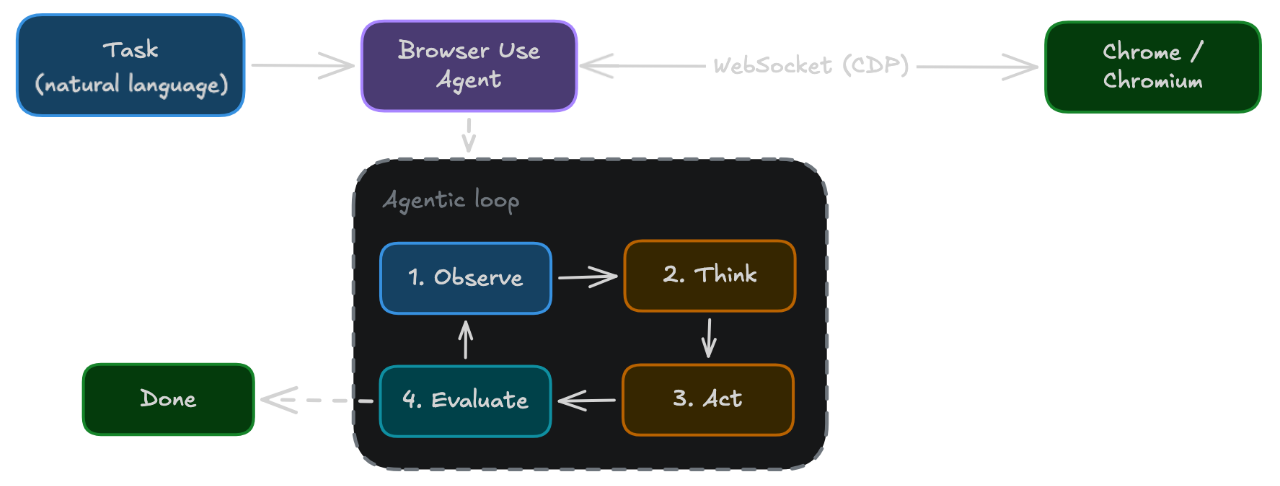
If your Playwright or Puppeteer script already works and you need managed browsers, Browser Use's Browser Infrastructure can supply remote Chromium sessions. You keep your automation logic and connect over CDP; using an AI agent is optional.
Conclusion
As a rule of thumb, start with Playwright for a new end-to-end test suite. Use Puppeteer for focused Node.js browser scripts, and Selenium when actual Safari, Grid, or your existing test infrastructure is the deciding requirement.
Pick the browsers and testing workflow you need first. Then choose the tool that covers those requirements with the least additional work for your team.