Web scraping in 2026 looks nothing like it used to. This guide covers how it works, what's changed, and which tools to use.
How Web Scraping Used to Work
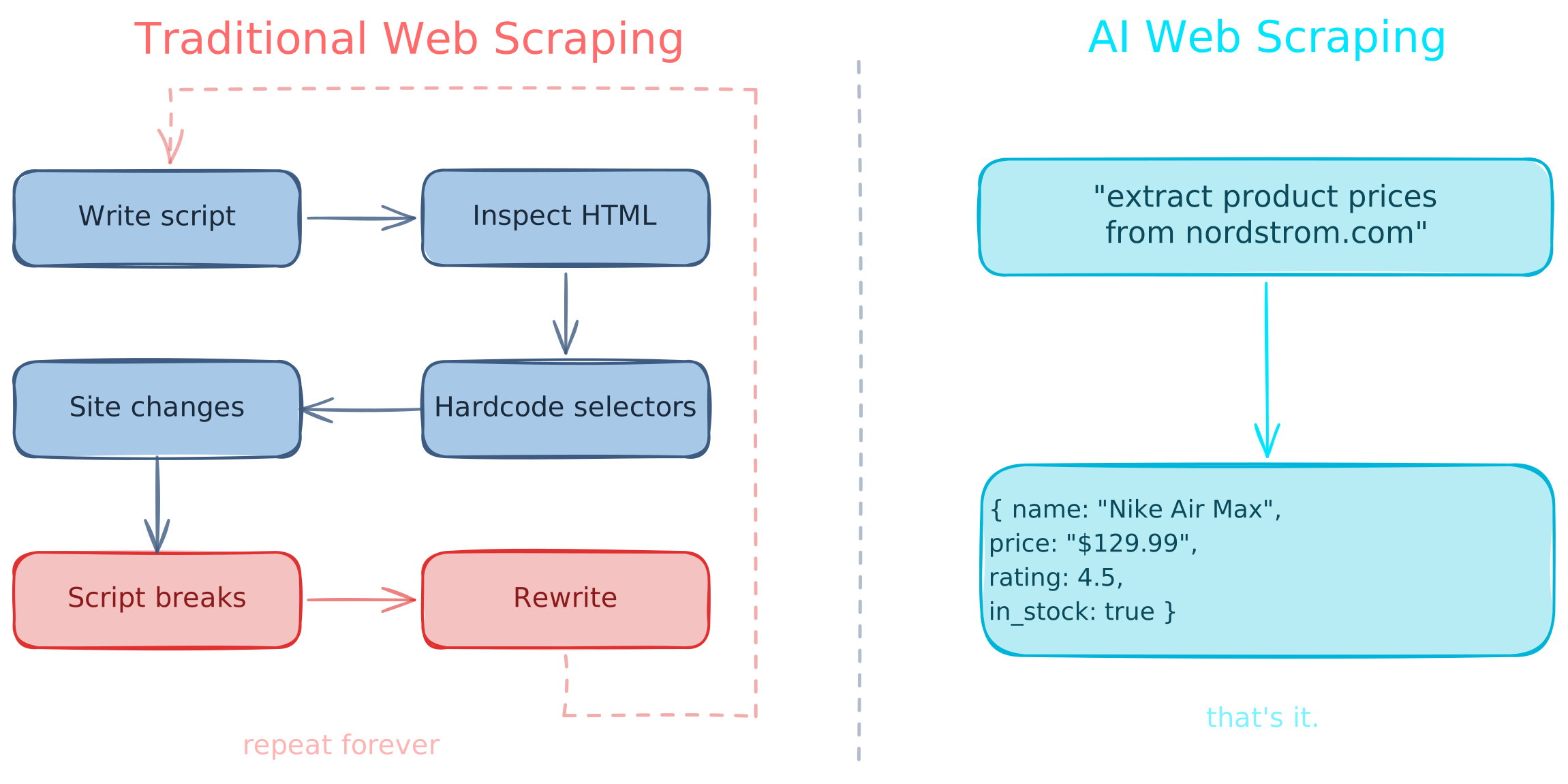
Traditional tools like BeautifulSoup, requests, and Playwright require you to write a custom script for each page you want to scrape. You inspect the HTML and write parsing logic specific to that page's structure.
This is fragile. Every site needs a new script. Sites also change regularly, which means maintaining scripts.
And if a page requires interaction, for instance clicking buttons, filling forms, or scrolling, you need to hardcode every step.
What AI Web Scrapers Changed
Tools can now parse content into clean, structured data extraction formats (markdown, JSON, custom schemas) without writing extraction logic.
A new wave of AI web scrapers can also interact with pages on their own, navigating, clicking, and typing based on natural language instructions instead of hardcoded scripts.
Basic vs Interactive Scraping
Basic
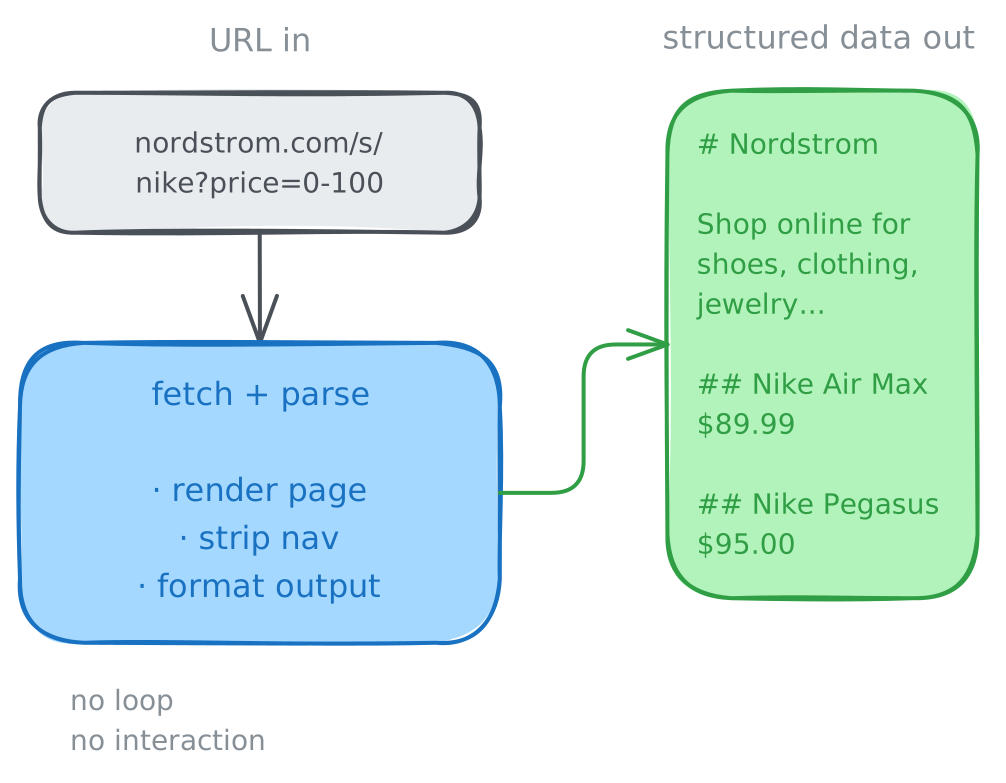
Basic scraping is when a task only uses a URL as input. The data is already in the page — you just need to grab it and parse it, sometimes converting it to a new format.
If you want a simple Python SDK to scrape a website, see our fetch-use guide.
Use cases:
- Content indexing — scraping blog posts, documentation, or news articles
- Site crawling — following links or sitemaps to scrape or map every page on a domain
- Public data — pulling data from catalogs, directories, or government databases
Interactive
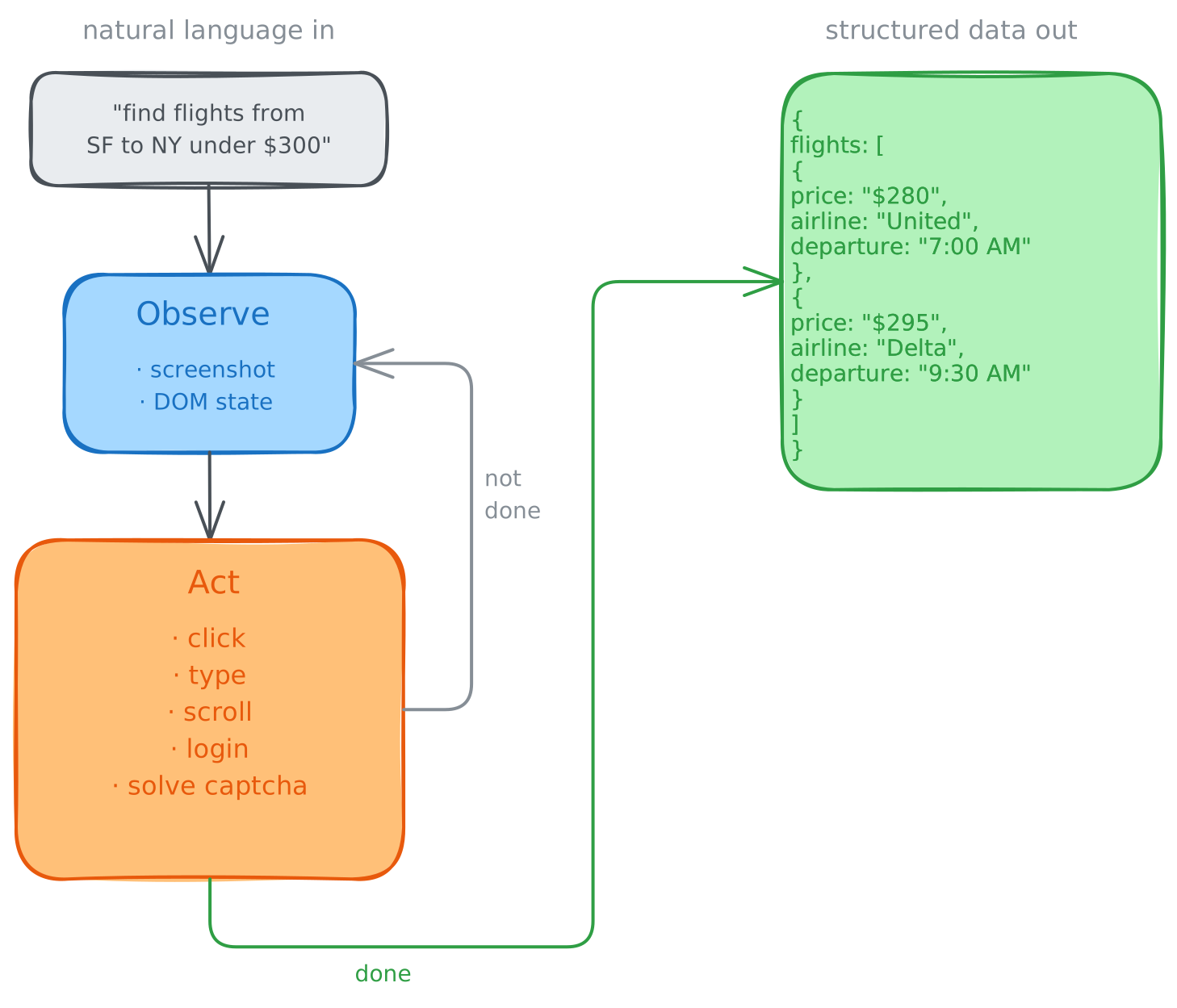
Interactive scraping means a scraper can act on a page to access data using browser automation.
Interactive scrapers can do everything basic scrapers can, and don't need a specific URL to start.
The valuable data on the web lives behind login walls and search interfaces. Static, public data is increasingly commoditized. This is why interactive scrapers have grown rapidly, with libraries like the Browser Use Open Source reaching over 83,000 Github stars.
Use cases:
- Private data — scraping anything behind a login wall (internal tools, paid databases, social media profiles)
- Filtering for data — applying search queries, selecting filters, choosing date ranges, or picking product variants before the target data appears
- Multi-page workflows — navigating pagination, "Load more" buttons, or completing multi-step forms
- Dynamic content — pages that require scrolling or popup modals
The Stealth Problem
All scrapers share one problem: stealth.
To access data on popular sites, scrapers need anti-bot bypass and CAPTCHA solving capabilities.
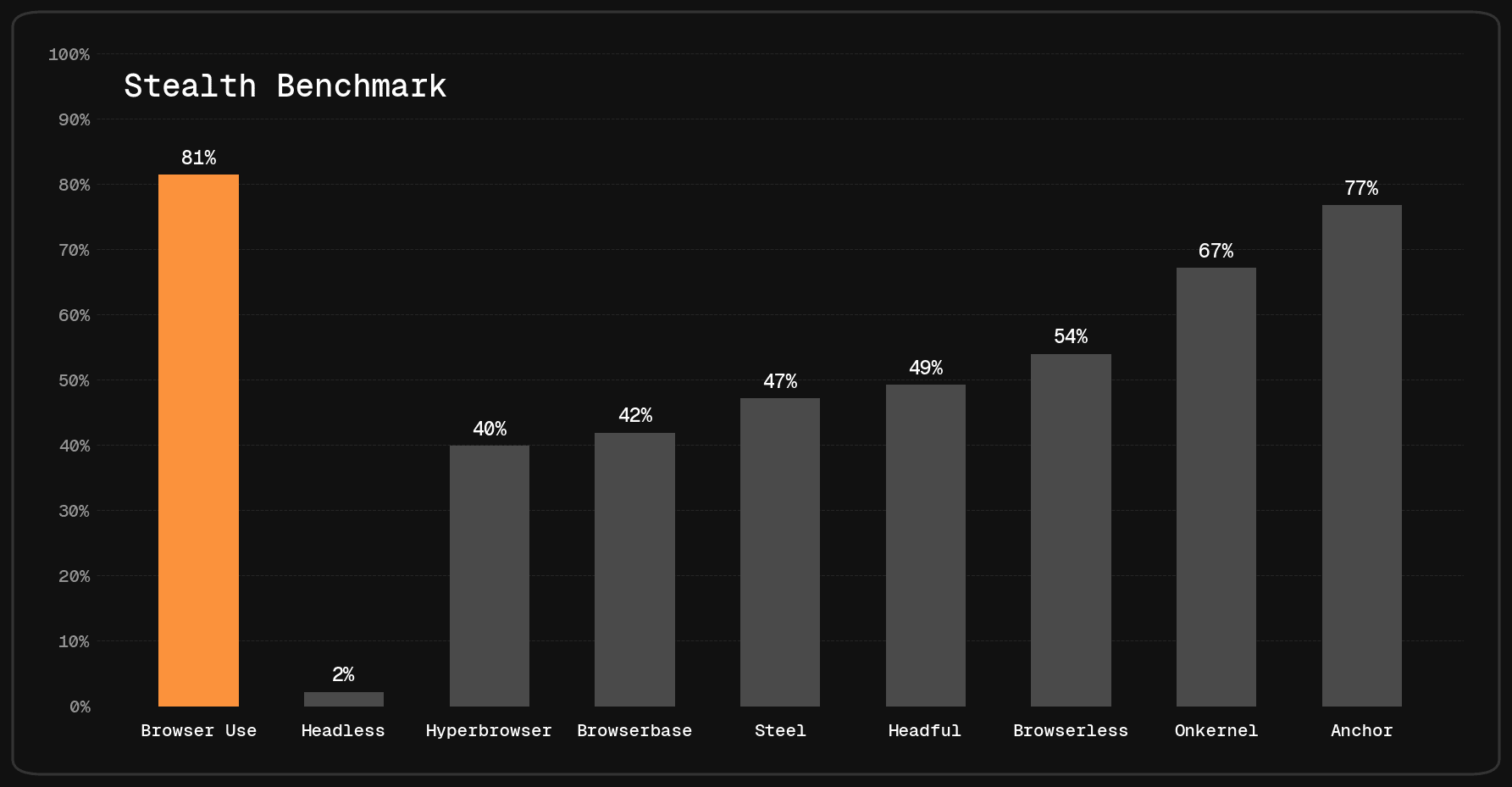
On the Browser Use Stealth Benchmark (71 websites with Cloudflare, Akamai, PerimeterX, Datadome, and other antibot vendors), Browser Use has the best stealth success rate at 81%, nearly double Browserbase's 42%:
- Browser Use Cloud: 81%
- Anchor: 77%
- Onkernel: 67%
- Steel: 47%
- Browserbase: 42%
- Hyperbrowser: 40%
On Halluminate's BrowserBench (296 tasks, third-party benchmark), Browser Use leads at 84.8% vs Browserbase's 70.3%:
- Browser Use Cloud: 84.8%
- Hyperbrowser: 76.4%
- Anchor: 76.0%
- Steel: 73.3%
- Browserbase: 70.3%
You can read more about it on our Stealth Benchmark Post.
Basic Web Scraping Tools
Firecrawl
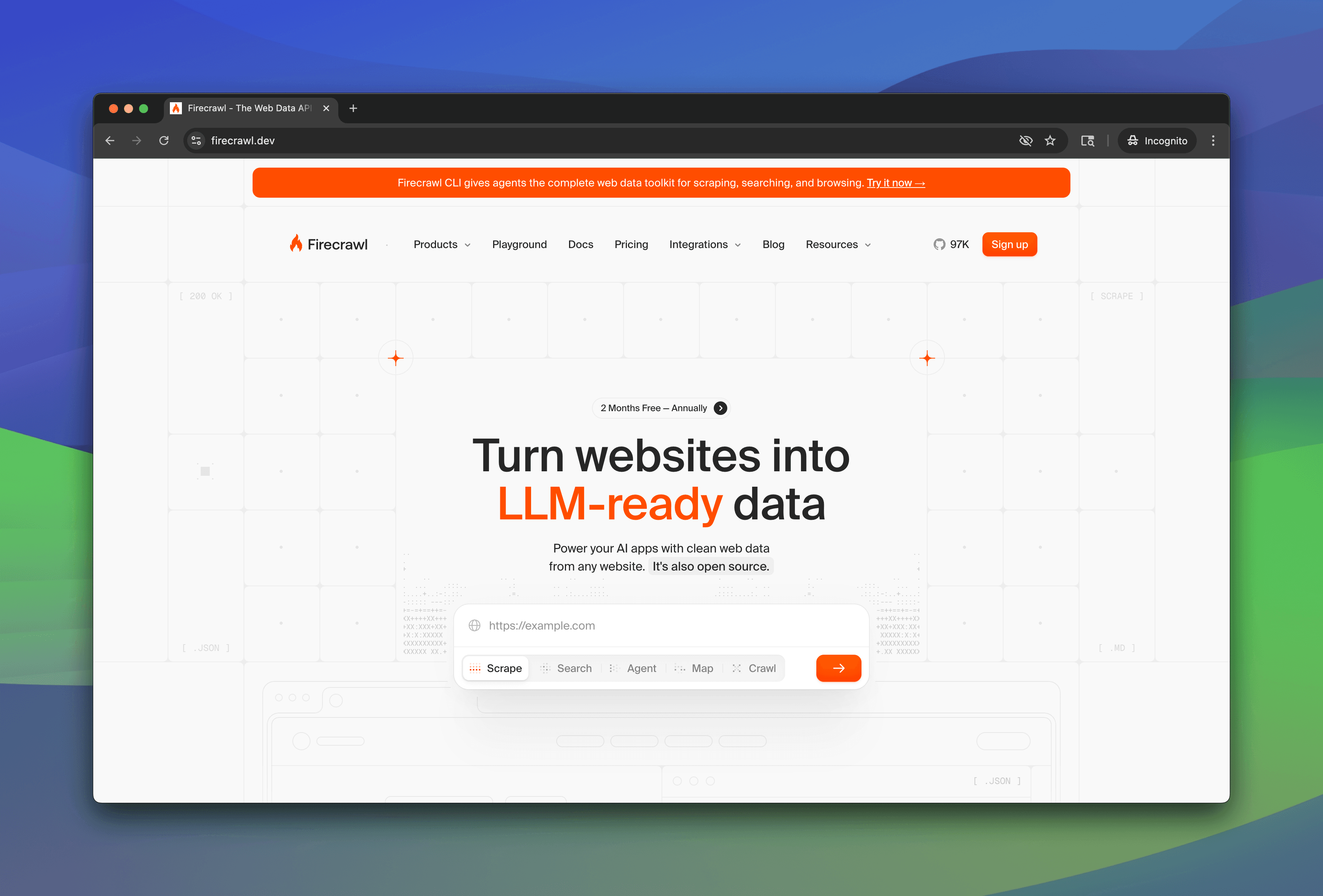
Firecrawl is a popular web scraping API for ingesting content for LLMs.
Firecrawl's API endpoints:
- /scrape : Scrapes an individual page
- /crawl : Traverses sitemap pages, scraping each
- /map : Gets all URLs of a page
- /extract : Structured data extraction
The markdown output is clean and token-efficient. Headers, footers, and navigation are stripped automatically, and change tracking is built-in.
Scraping data from most sites works great (even protected ones):
from firecrawl import FirecrawlApp

app = FirecrawlApp(api_key="fc-YOUR_API_KEY")

result = app.scrape("https://www.browser-use.com", formats=["markdown"])

print(result.markdown)# The Way AI uses the web.
Agents at scale. Undetectable browsers.
The API for any website.
Trusted by teams at
Airbnb, Amazon, Anthropic, Apple, Datadog,
DeepMind, Google, Meta, Microsoft, OpenAI,
Shopify, Stripe, Uber, Zapier...However, there are many sites where Firecrawl gets blocked. For instance, Nordstrom:
from firecrawl import FirecrawlApp

app = FirecrawlApp(api_key="fc-YOUR_API_KEY")

result = app.scrape("https://www.nordstrom.com", formats=["markdown"])

print(result.markdown)If you are an individual Nordstrom customer, and you believe
this is a mistake, contact our Customer Service at 1.888.282.6060
To keep our site secure, we don't allow unidentified,
automated traffic.
Pros
- Clean markdown output, good for LLM ingestion
- Easy-to-use API with good DX
- Built-in crawling and site mapping
- Open-source community
Cons
- Blocked by anti-bot on major retailers and protected sites
- No captcha solving
- Interactive scraping (via agent-browser) uses Playwright under the hood and isn't very effective
Cost: ~$0.001/basic scrape
Cloudflare Browser Rendering
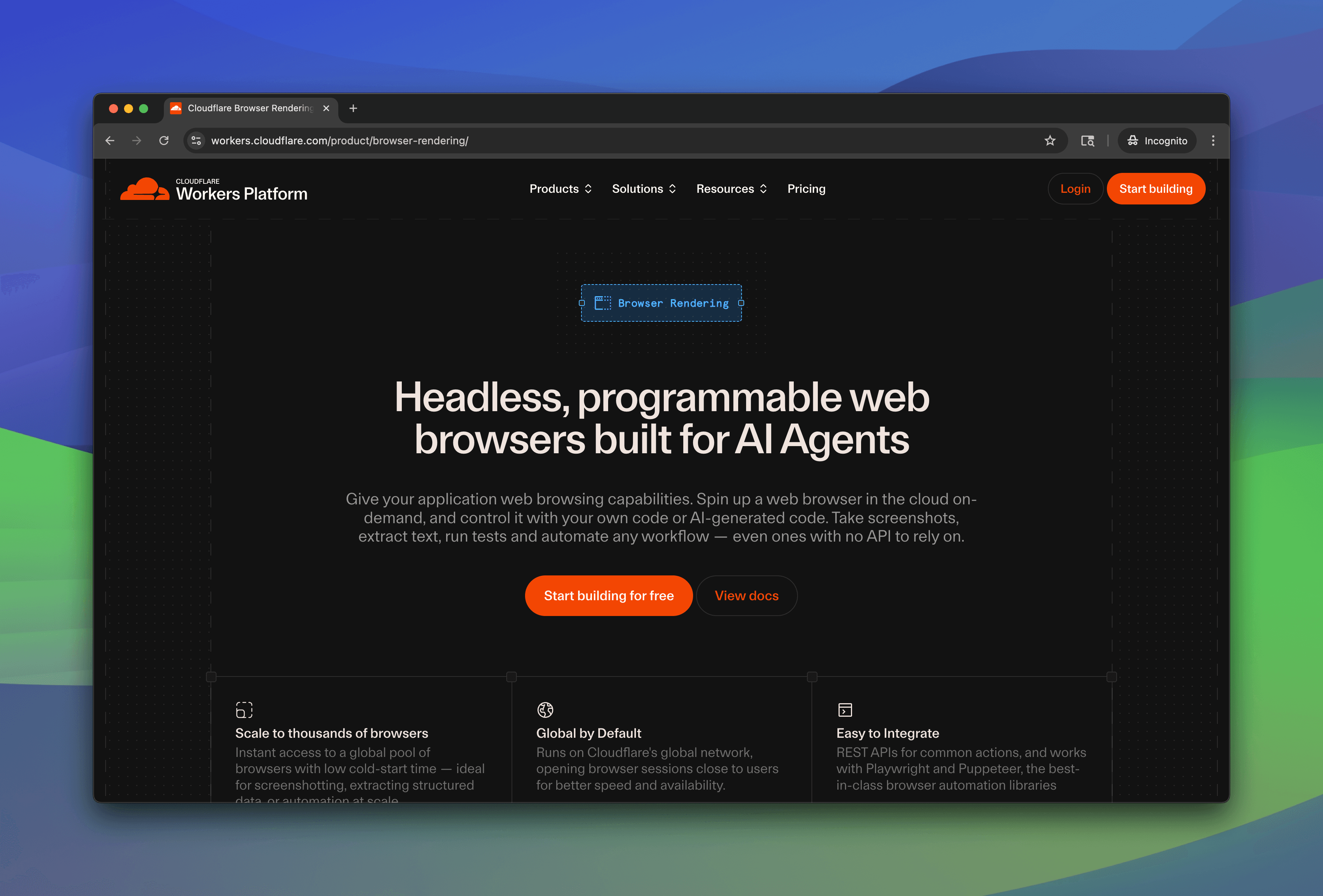
Cloudflare Browser Rendering intentionally uses zero stealth, and explicitly identifies itself as bot traffic. This means that they get blocked extremely often.
However, they're the cheapest option by far. Their endpoints look similar to Firecrawl's:
- /content : Raw HTML with JS rendering
- /markdown : Page converted to markdown
- /scrape : CSS selector-based extraction
- /json : AI-powered structured extraction (Workers AI, Claude, or GPT-4o)
- /links : All links on a page
- /crawl : Multi-page crawling (beta)
Unprotected sites work great:
import requests

result = requests.post(
    "https://api.cloudflare.com/client/v4/accounts/ACCOUNT_ID/browser-rendering/markdown",
    headers={"Authorization": "Bearer YOUR_API_KEY"},
    json={"url": "https://www.browser-use.com"},
)

print(result.json()["result"])# The Way AI uses the web.
Agents at scale. Undetectable browsers.
The API for any website.
Trusted by teams at
Airbnb, Amazon, Anthropic, Apple, Datadog,
DeepMind, Google, Meta, Microsoft, OpenAI,
Shopify, Stripe, Uber, Zapier...Unsurprisingly, Cloudflare does not work on Nordstrom, similarly to Firecrawl.
Pros
- Cheapest option by far
- Backed by Cloudflare's infrastructure
- Good endpoint variety (markdown, JSON, crawl)
Cons
- Zero stealth — intentionally identifies as bot traffic
- Blocked by any site with anti-bot protection
- No captcha solving
- No interactive scraping
Cost: ~$0.0005/basic scrape; Free tier gives 10 minutes of browser time per day.
Bright Data
Bright Data's specialty is stealth, where they have high quality proxies and captcha solving capabilities.
Their basic scraping endpoints include:
- Web Unlocker : Proxied scraping with automatic anti-bot bypass, CAPTCHA solving, and fingerprint management
- Web Scraper API : Pre-built scrapers for specific platforms (Amazon, LinkedIn, Instagram, etc.) returning structured JSON
- Crawl API : Full-domain crawling that outputs structured, LLM-compatible data
Where it works
Same Nordstrom page that blocked Firecrawl and Cloudflare? Bright Data gets through:
import requests

result = requests.post(
    "https://api.brightdata.com/request",
    headers={"Authorization": "Bearer YOUR_API_KEY"},
    json={
        "zone": "web_unlocker1",
        "url": "https://www.nordstrom.com",
        "format": "raw",
        "data_format": "markdown",
    },
)

print(result.text)# Nordstrom Online & in Store: Shoes, Jewelry,
Clothing, Makeup, Dresses
Shop online for shoes, clothing, jewelry, dresses,
makeup and more from top brands. Free shipping.
Free returns.
... 449KB of rendered contentHowever, this task took 12 seconds to complete.
Pros
- High stealth with quality proxies
- Built-in captcha solving
- Pre-built scrapers for popular platforms (Amazon, LinkedIn, etc.)
Cons
- Expensive and slow
- Difficult to set up
Cost: ~$0.003/basic scrape
Interactive Web Scraping Tools
Browser Use
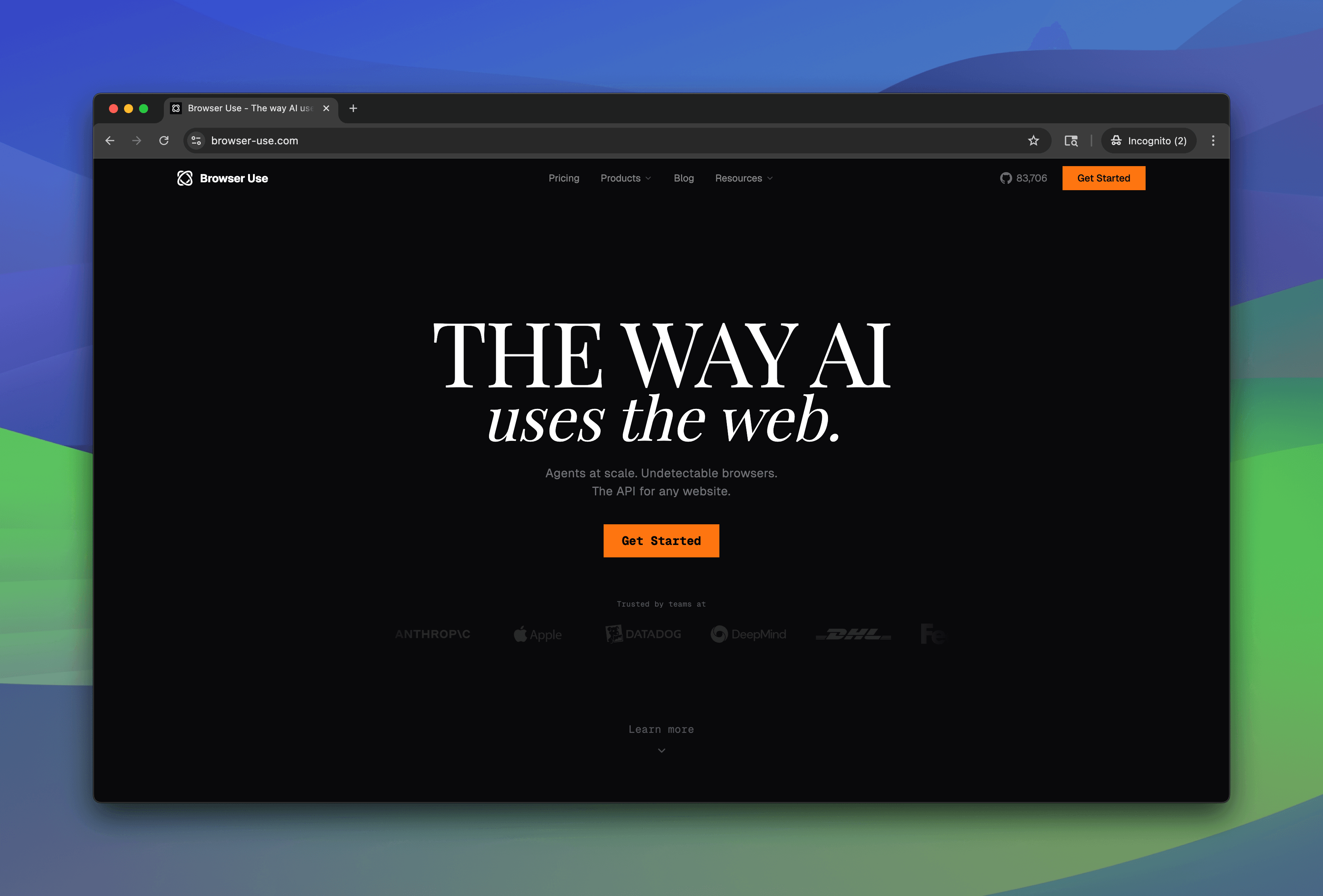
Browser Use provides web agents and remote stealth browsers for AI browser automation. Describe a task in natural language, and it handles the rest: navigating, clicking, typing, and extracting data.
The v3 API has one endpoint:
- /sessions: Create a session with a natural language query, proxy location, and model.
Basic extraction
A simple structured data extraction task:
from browser_use_sdk.v3 import AsyncBrowserUse

client = AsyncBrowserUse(api_key="YOUR_API_KEY")

result = await client.run(
    "Go to browser-use.com and extract the heading, subheading, and trusted-by company names",
)

print(result.output)Heading: The Way AI uses the web.
Subheading: Agents at scale. Undetectable browsers.
The API for any website.
Trusted by: Amazon, Anthropic, Apple, Datadog,
DeepMind, Google, Meta, Microsoft, OpenAIScraping protected sites
Browser Use gets through sites that block other providers. Crocs.com, for instance, renders as a completely blank page on Browserbase. Browser Use extracts the full navigation:
from browser_use_sdk.v3 import AsyncBrowserUse

client = AsyncBrowserUse(api_key="YOUR_API_KEY")

result = await client.run(
    "Go to crocs.com and extract the main product categories",
)

print(result.output)The main product categories are:
1. Women
2. Men
3. Kids
4. Sale
5. Jibbitz™ Charms
6. Crocs at Work™
7. Bags & Accessories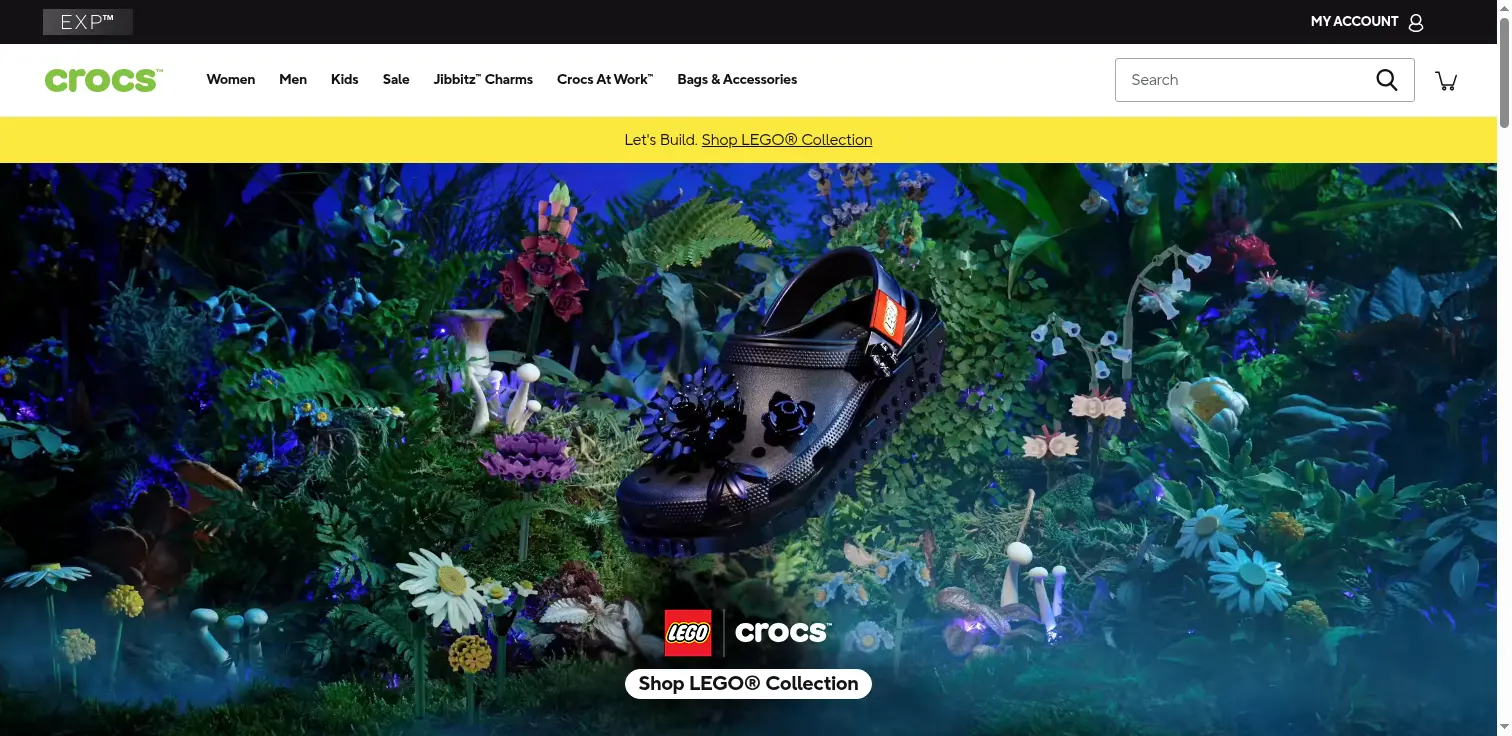
Nordstrom works too:
from browser_use_sdk.v3 import AsyncBrowserUse

client = AsyncBrowserUse(api_key="YOUR_API_KEY")

result = await client.run(
    "Go to nordstrom.com and extract the main product categories",
)

print(result.output)The categories are:
1. New
2. Sale
3. Women
4. Men
5. Beauty
6. Shoes
7. Accessories
8. Kids
9. Designer
10. Home
11. Gifts
12. Services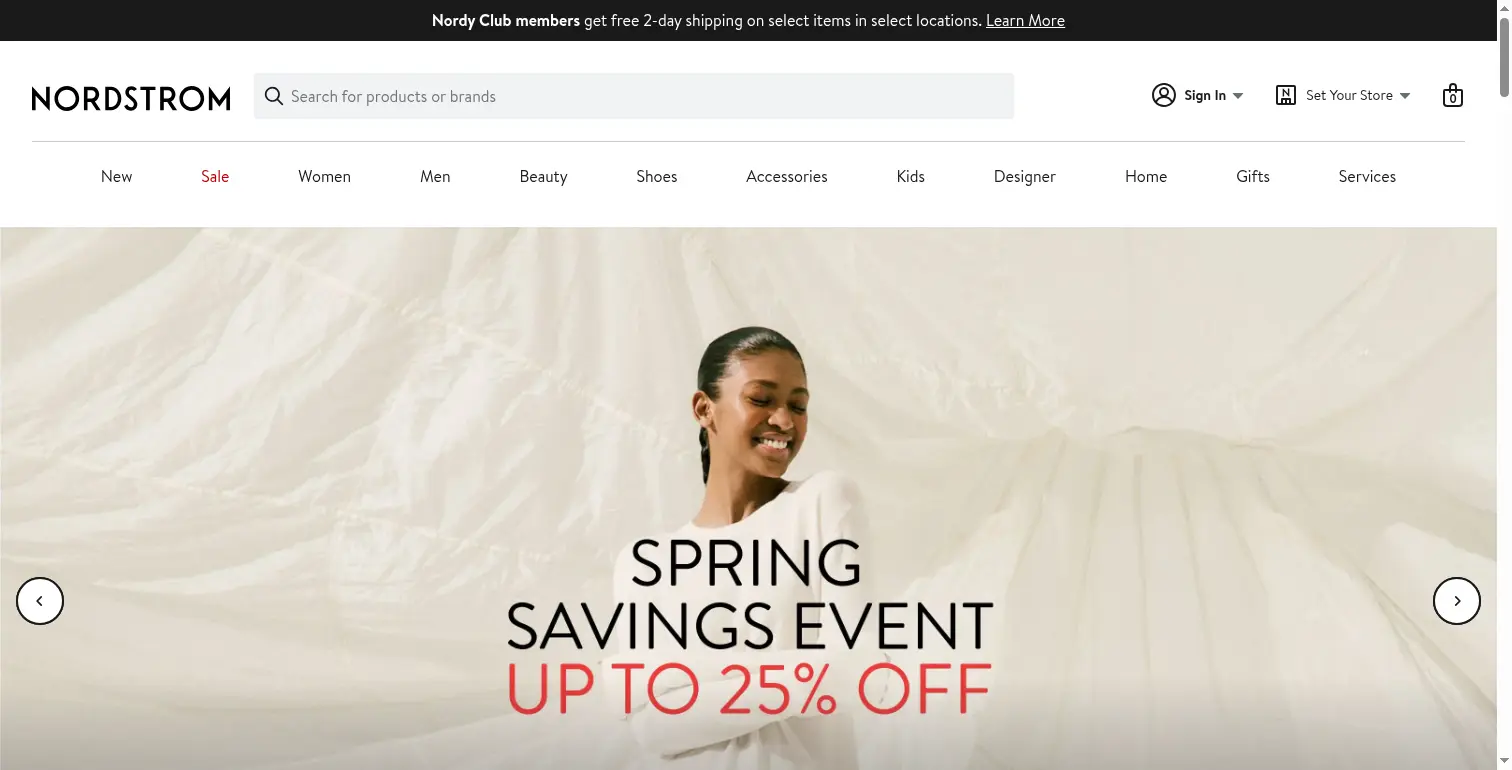
Multi-step workflows
A single prompt can navigate pagination, click through filters, and extract across multiple pages:
from browser_use_sdk.v3 import AsyncBrowserUse

client = AsyncBrowserUse(api_key="YOUR_API_KEY")

result = await client.run(
    "Go to amazon.com, search for 'wireless headphones', filter by price under $100, and extract the top results with prices and ratings",
)

print(result.output)16 wireless headphones under $100:
1. Apple AirPods 4 - $99.00 (4.5/5, 44.8K reviews)
2. Sony WH-CH520 - $48.00 (4.5/5, 30.7K reviews)
3. Soundcore Q20i ANC - $44.99 (4.6/5, 57.6K reviews)
4. JBL Vibe Beam - $29.95 (4.3/5, 36K reviews)
5. BERIBES Over Ear - $19.99 (4.5/5, 52.5K reviews)
6. Picun B8 120H - $17.98 (4.6/5, 11.7K reviews)
7. JBL Tune 510BT - $49.95 (4.5/5, 90.1K reviews)
8. TOZO A1 - $12.31 (4.3/5, 111.8K reviews)
...
Results saved to amazon_wireless_headphones.jsonEnd-to-end flows with integrations
Browser Use has 950+ integrations, so you can pipe scraped data into Google Sheets, Slack, or a database without glue code, as well as plug in data sources.
Here's an example scraping my personal Twitter and extracting results into a Google Sheet:
Infrastructure
- Custom Chromium fork with C++/OS-level stealth patches (bypasses Cloudflare, Akamai, PerimeterX, DataDome)
- Free CAPTCHA solving for all customers (Cloudflare Turnstile, reCAPTCHA, PerimeterX)
- Residential proxies in 195+ countries
Pros
- Highest stealth success rate across benchmarks
- Free captcha solving for all customers
- Handles both basic and interactive scraping
- Natural language task description, no scripting needed
- Highest accuracy on Online Mind2Web benchmark (97%)
- 950+ integrations for end-to-end flows
- Enterprise-ready, SOC-2 compliant
- Open-source community
Cons
- More expensive than basic scrapers for simple page fetches
- Variable step counts per task
Browserbase (Stagehand)
Browserbase's Stagehand adds natural language instructions for navigating, acting, and extracting structured data.
Stagehand has three core primitives:
- observe: find elements
- act: click, type, scroll via natural language
- extract: pull structured data with a JSON schema
Here's an example:
import asyncio
from stagehand import AsyncStagehand

async def main():
    async with AsyncStagehand(
        browserbase_api_key="YOUR_BROWSERBASE_API_KEY",
        browserbase_project_id="YOUR_PROJECT_ID",
        model_api_key="YOUR_MODEL_API_KEY",
    ) as client:
        session = await client.sessions.start(model_name="anthropic/claude-sonnet-4-6")
        await session.navigate(url="https://www.browser-use.com")

        result = await session.extract(
            instruction="extract the heading, subheading, and trusted-by company names",
        )
        print(result)
        await session.end()

asyncio.run(main()){
"heading": "THE WAY AI uses the web.",
"subheading": "Agents at scale. Undetectable browsers.\nThe API for any website.",
"trusted_by_companies": ["Airbnb", "Amazon", "Anthropic", "Apple",
"Datadog", "DeepMind", "DHL", "FedEx", "Flexport", "Google",
"Meta", "Microsoft", "OpenAI", "SAP", "Shopify", "Stripe",
"Uber", "UPS", "Zapier"]
}Even with Browserbase's proxies enabled, some protected sites still don't render. Crocs.com shows a completely blank page:

Pros
- More step-by-step control over browser automation with observe/act/extract primitives
- Open-source community
Cons
- Weak stealth — gets blocked on more sites than Browser Use
- Advanced stealth mode is reserved for custom/enterprise plans
Benchmarks for Interactive Scrapers
Online Mind2Web is a benchmark that evaluates web agent performance on live websites, and includes performance metrics from Browser Use, Browserbase, Gemini Computer Use, and more.
Browser Use scores 97%, the highest of any provider. Browserbase's Stagehand scores 65%.
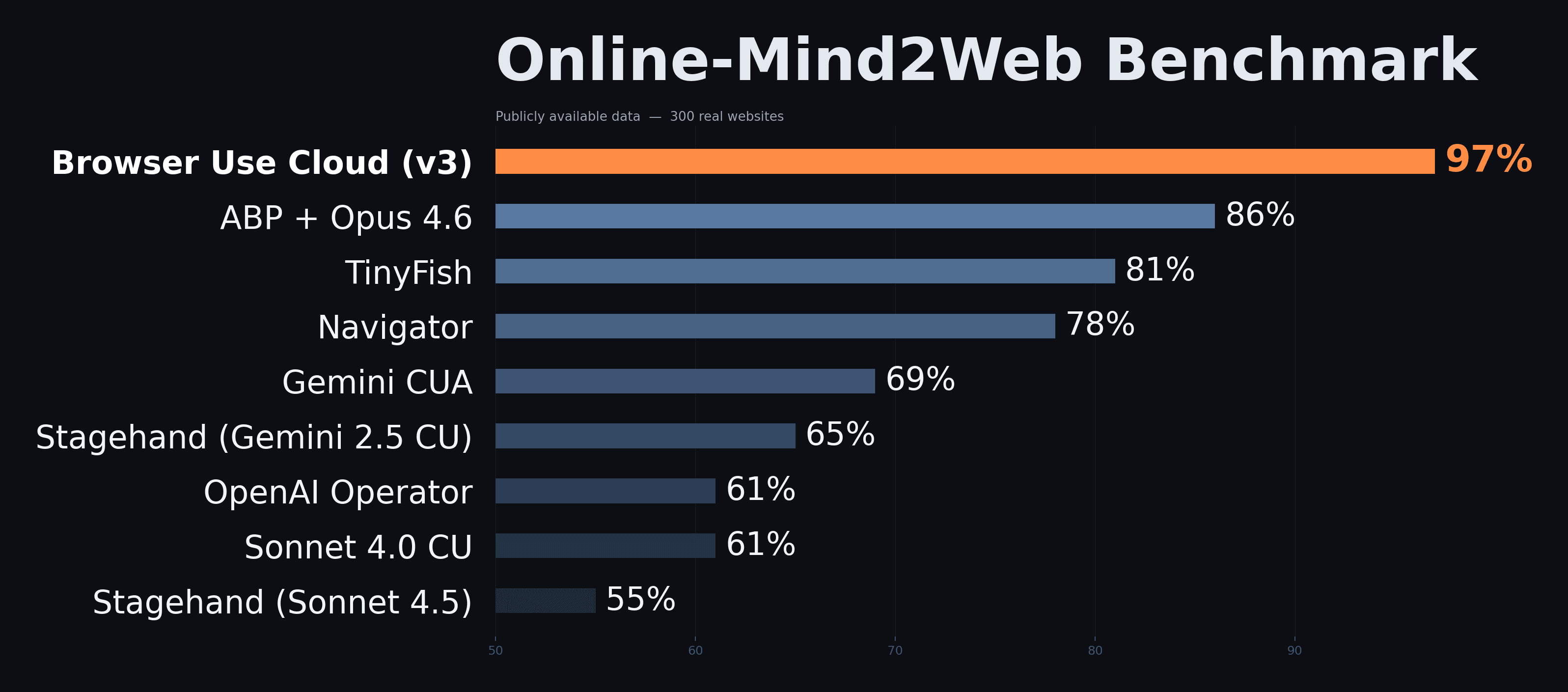
You can read about it on the Online Mind2Web Benchmark Post.
Cost Comparison: Browser Use vs Browserbase
To compare real costs, we ran a simple task on both providers 5 times each and averaged the results.
Task: Go to Hacker News. For each of the top 20 articles, extract the article title and the first comment.
Browser Use
from browser_use_sdk.v3 import AsyncBrowserUse

client = AsyncBrowserUse(api_key="YOUR_API_KEY")

result = await client.run(
    "Go to Hacker News. For each of the top 20 articles, extract the article title and the first comment.",
    model="bu-max",
)

print(result.output)1. Epoch confirms GPT5.4 Pro solved a frontier math open problem
> "I have long said I am an AI doubter until AI could print out..."
2. Box of Secrets: Discreetly modding an apartment intercom
> "I'm actually pretty surprised how bad the intercom ecosystem..."
3. FCC updates covered list to include foreign-made consumer routers
> "The FCC maintains a list of equipment and services (Covered..."
... (20 articles with first comments)Browserbase (Stagehand Agent)
Same task, using Stagehand's agent mode in hybrid mode with Claude Sonnet 4.6. In testing, the default step limit cut the agent off before it could complete all 20 articles, so we set maxSteps: 50:
import { Stagehand } from "@browserbasehq/stagehand";

const stagehand = new Stagehand({
  env: "BROWSERBASE",
  experimental: true,
  model: { modelName: "anthropic/claude-sonnet-4-6", apiKey: "YOUR_KEY" },
});

await stagehand.init();

const agent = stagehand.agent({
  mode: "hybrid",
  model: "anthropic/claude-sonnet-4-6",
});

const result = await agent.execute({
  instruction: "Go to Hacker News. For each of the top 20 articles, extract the article title and the first comment.",
  maxSteps: 50,
});

console.log(result.message);
await stagehand.close();All 20 articles were processed. The automation
successfully navigated to news.ycombinator.com,
extracted all 20 article titles and their comment
page URLs, visited each of the 20 comment pages,
and extracted the first comment from each page.Results
| Browser Use | Browserbase | |
|---|---|---|
| Cost | 1.46 | |
| Time | ~60s | ~401s |
Both completed the task, but Browserbase cost 4.4x more and took 6.7x longer.
The Most Popular Web Scraping Tools: Compared
Interactive Scraping
| Best for | Cost | Stealth | Captcha Solving | Integrations | |
|---|---|---|---|---|---|
| Browser Use | End-to-end web automation | $0.33/task* | High | Free | 950+ |
| Browserbase | Step-by-step browser control | $1.46/task* | Medium | Paid plans | <10 |
*Cost for extracting 20 HN articles + first comments.
Basic Scraping
| Best for | Cost | Stealth | |
|---|---|---|---|
| Firecrawl | LLM-ready markdown extraction | ~$0.001/scrape | Medium |
| Bright Data | Protected sites at scale | ~$0.003/scrape | High |
| Cloudflare BR | Cheapest option for basic scraping | ~$0.0005/scrape | None |
Which Web Scraper Should You Use?
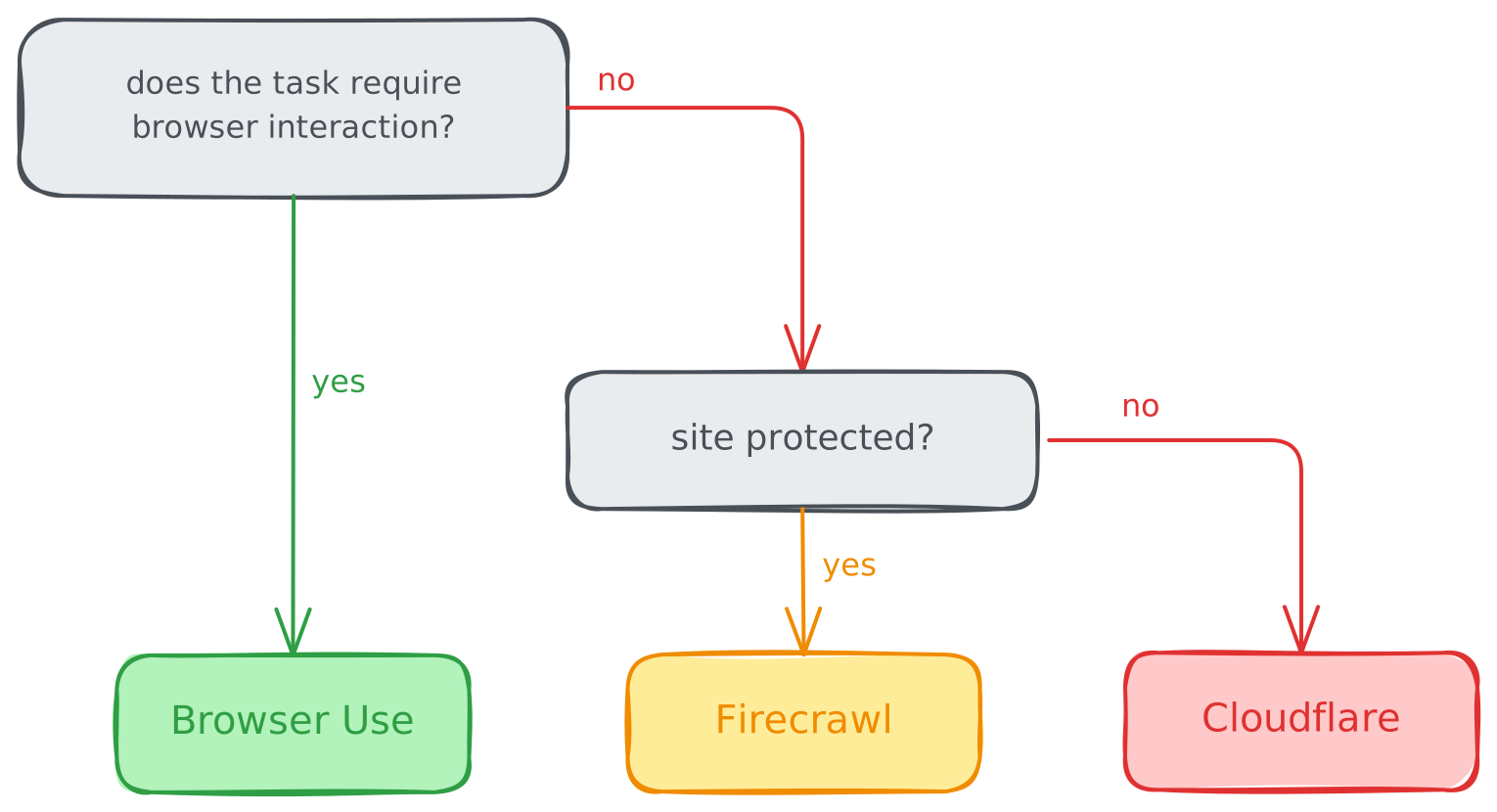
Most teams start with a basic scraper and hit a wall when they need to access a protected site, interact with a page, or log in. Then they write fallback logic and maintain two pipelines.
Browser Use has the highest accuracy and stealth success rate, and handles everything from basic scraping to complex queries, and has integrations to ingest, process, and store data end-to-end.
For simple page fetches, basic scrapers like Firecrawl and Cloudflare work fine, and Bright Data for enterprise scale. But most scraping tasks eventually need stealth, interaction, or both.
Try it at cloud.browser-use.com.