BROWSER USE

- Browser Use Agents: give Browser Use a task and receive completed work. API V4 is current for new integrations.
- Browser Infrastructure: connect your agent or automation to managed browsers through SDK, REST, or CDP. Starts at $0.02/browser-hour.
- Developer tools: Open Source, Browser Harness, SDK, and MCP support the two products above.

[Developer Index](https://browser-use.com/index.md)
[Product Map](https://browser-use.com/llms.txt)
[Full Product Context](https://browser-use.com/llms-full.txt)
[Pricing](https://browser-use.com/pricing.md)
[Cloud Docs](https://docs.browser-use.com/cloud/quickstart)
[Open Source Docs](https://docs.browser-use.com/open-source/introduction)

---

# How Parallel AI Uses Browser Use for Authenticated Research

Parallel × Browser Use

## Parallel needed a page behind a login.Browser Use opened it.

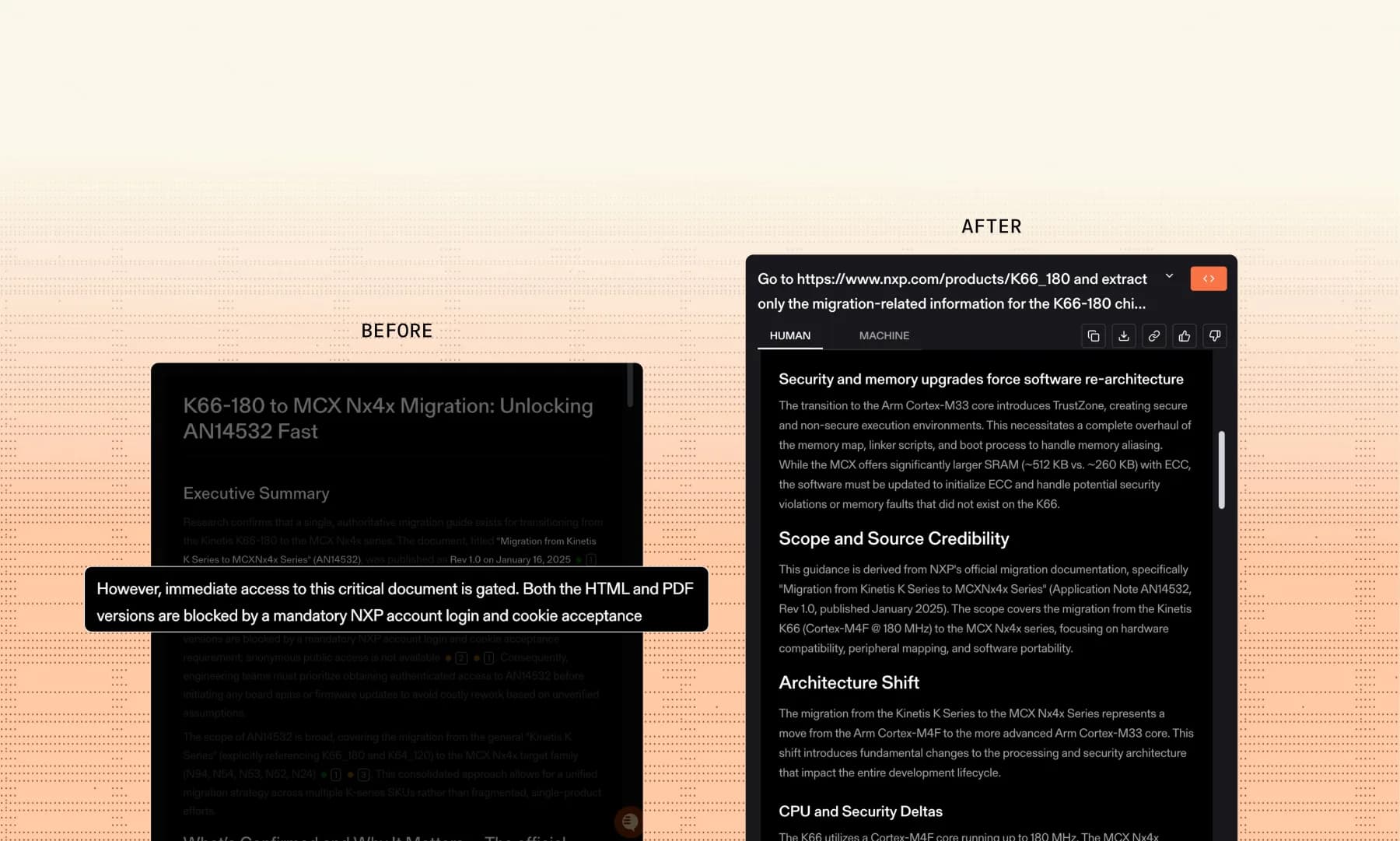
Parallel's Task API hands login-protected sources to the Browser Use MCP, which completes the login and fetches the page. The answer comes back with that source cited.

Before MCP · stopped at loginWith Browser Use · source returned
![](https://browser-use.com/_next/image?url=%2Fcase-studies%2Fparallel-browser-use-authenticated-research.webp&w=3840&q=75)

Before MCP · stopped at login

With Browser Use · source returned

Parallel's published example

Before and after connecting the Browser Use MCP: the report that stopped at NXP's account login, then the completed task with the K66-180 migration details and their source.

[Source](https://parallel.ai/blog/authenticated-page-access)

One handoff

## Parallel keeps the task. Browser Use reaches the page.

The login stays in the browser session. Parallel gets the source back and finishes the answer.

![The Browser Use homepage handoff: Parallel's task reaches toward the logged-in web](https://browser-use.com/_next/image?url=%2Fcase-studies%2Fparallel-browser-use-handoff.webp&w=3840&q=75)

Parallel taskLogged-in web

## Add Browser Use as an MCP server.

One mcp\_servers entry on a Task API run. This is Parallel's sample request for the NXP task.

From [Parallel's announcement](https://parallel.ai/blog/authenticated-page-access).

POST /v1/tasks/runsParallel Task API

```
curl -X POST "https://api.parallel.ai/v1/tasks/runs" \
  -H "x-api-key: $PARALLEL_API_KEY" \
  -H "Content-Type: application/json" \
  --data '{
    "input": "Go to https://www.nxp.com/products/K66_180 and extract only the migration-related information for the K66-180 chip, specifically documentation on Migration from Kinetis K Series to MCXNx4x Series.",
    "processor": "ultra",
    "mcp_servers": [{
      "type": "url",
      "url": "https://api.browser-use.com/mcp",
      "name": "browseruse",
      "headers": { "Authorization": "Bearer YOUR_BROWSERUSE_API_KEY" }
    }]
  }'
```

## Connect Browser Use to your Parallel tasks.

[Read the setup guide](https://docs.parallel.ai/integrations/browseruse)[Get a Browser Use API key](https://cloud.browser-use.com/settings?tab=api-keys&new=1)
